




商品#:
160677167
Vgate vLinker MC+ Bluetooth 4.0 OBD2 Scan Tool(for Android, iOS, Windows) & Vgate iCar Pro Bluetooth 4.0 OBD2 Diagnostic Tool(for Android, iOS,
商品#:
160677167
TWD 4305
Price Details
Excluding Shipping & Custom charges ( Shipping and custom charges will be calculated on checkout )
*All items will import from 美國
0 ratings
撰寫評論
有存貨
 從USA商店匯入
Secured transaction
Ubuy works hard to protect your security and privacy. Our advanced payment security system ensures confidentiality by encrypting your information during transmission using AES (Advanced Encryption Standards) and SSL (Secure Socket Layer) protocols. Your payment details are 100% secure as we do not share your payment details with third party sellers.
Our Top Logistics Partners


Turn your phone into a car scanner in seconds with Vgate vLinker MC+ and iCar Pro Bluetooth 4.0 OBD2 tools.
此捆綁包包含 2 件商品

Fast
Shipping

Free
Return*

Secure Packaging

100% Original Products

PCI DSS Compliance

ISO 27001 Certified


What Stands Out
Cross-Platform Compatibility
Supports Android, iOS, and Windows devices, providing users with the flexibility to connect and diagnose their vehicles using their preferred platform, enhancing accessibility and convenience.
Bluetooth 4.0 Technology
Equipped with advanced Bluetooth 4.0, ensuring faster data transfer and reliable connectivity, allowing users to quickly access their vehicle's diagnostics without the hassle of wired connections.
Comprehensive Diagnostics
Offers extensive OBD2 diagnostic capabilities, enabling users to read and clear error codes effectively, helping to identify and resolve vehicle issues efficiently, saving time and cost on repairs.
產品詳情
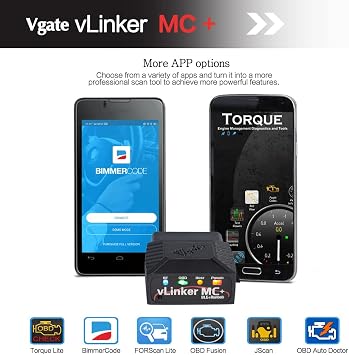
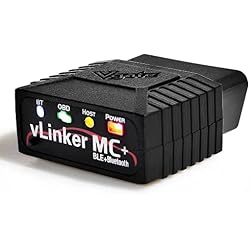
- - Advanced Protocol Support: Vgate vLinker MC+ OBD2 diagnostic tool supports SW-CAN and MS-CAN protocols, providing access to proprietary GM and Ford networks alongside all five standard OBD2 protocols. It’s part of our popular line that includes the Vgate iCar Pro Bluetooth.
- - Special iOS Support: Unlike the vLinker MC Bluetooth, the Vgate vLinker MC+ Bluetooth scan tool extends support to iOS devices like iPhones and iPads, making it a versatile choice for users across multiple platforms.
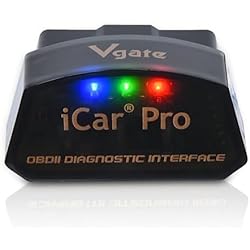
- - LOW POWER CONSUMPTION - Vgate iCar Pro Bluetooth 4.0 adapter supports auto sleep & auto wake and consumes as low as 3MA when sleeping, which helps save car battery power. Note: auto wake for electric and hybrid vehicles is not supported. Requires reinsertion to wake up.
- - WORK WITH MANY OBD2 APPS: Works with popular apps like OBD JScan, Torque, Car Scanner, and BimmerCode. Turn your phone into a car scanner in seconds. Some apps might charge extra fees
- - SUPPORT UPGRADE: Update the Vgate iCar Pro Bluetooth 4.0 device and Vgate vLinker MC+ Bluetooth 4.0 using your phone or Windows PC. Need help? Contact Vgatemall support
| Power Source | Vehicle |
| Operating System | Android, iOS & Windows |
| Brand Name | Vgate |
| Brand | Vgate |
| Item Weight | 0.5 lbs (230 grams) |
Who Should Buy?

-
Car Enthusiasts
Ideal for car hobbyists who want detailed diagnostics and performance monitoring on their vehicles through smartphones.
-
DIY Mechanics
Great for individuals who perform their own vehicle maintenance and repairs, providing necessary diagnostic tools on the go.
-
Tech-Savvy Drivers
Perfect for those comfortable with technology, allowing seamless integration of smartphone apps for advanced vehicle diagnostics.

-
Non-Technical Users
Not suitable for users unfamiliar with vehicle diagnostics and technology, as setup may be overly complex.
產品描述
有疑問? 和我們聊天
客戶問答
-
問題:
What devices are compatible with the Vgate vLinker MC+ and Vgate iCar Pro Bluetooth 4.0 OBD2 tools?
Answer: Both the Vgate vLinker MC+ and Vgate iCar Pro are designed to work with Android, iOS, and Windows devices. This broad compatibility means users can use these diagnostic tools with smartphones, tablets, or laptops without being restricted to a specific platform. For example, you can seamlessly connect the tools to an Android smartphone to read diagnostic trouble codes or connect with a Windows laptop to perform more advanced vehicle diagnostics. This versatility makes them ideal for both casual users and automotive professionals. -
問題:
How do I connect the Vgate OBD2 tools to my vehicle?
Answer: Connecting the Vgate vLinker MC+ or Vgate iCar Pro to your vehicle is straightforward. Simply plug the OBD2 device into your vehicle's OBD2 port, which is usually located under the dashboard near the driver's seat. Then, ensure Bluetooth is enabled on your device and launch the compatible app designed for these tools. Follow the app's instructions to pair with the OBD2 device. This setup allows you to access real-time data from your vehicle, making it essential for troubleshooting performance issues or conducting regular maintenance checks. -
問題:
What functions can I perform with the Vgate vLinker MC+ and iCar Pro tools?
Answer: With the Vgate vLinker MC+ and Vgate iCar Pro, you can perform a variety of functions such as reading and clearing diagnostic trouble codes (DTCs), monitoring engine parameters, and viewing real-time data from various sensors. This capability enables you to effectively diagnose issues within your vehicle's engine and emission systems. For example, if your check engine light comes on, you can quickly connect the tool to determine the exact issue and take appropriate action, whether it involves a DIY fix or consulting a mechanic. -
問題:
Can I use these OBD2 tools for multiple vehicles?
Answer: Yes, the Vgate vLinker MC+ and Vgate iCar Pro tools can be used on multiple vehicles, provided they are OBD2 compliant. Most vehicles manufactured after 1996 in the Taiwan, as well as many models in other regions, support OBD2 standards. This feature is particularly beneficial for families or automotive hobbyists who own several vehicles. By simply switching the device among your cars, you can efficiently monitor and diagnose each vehicle's performance without the need for separate tools. -
問題:
Is there a limit to the types of engine data I can monitor?
Answer: There is no inherent limit to the types of engine data you can monitor with the Vgate vLinker MC+ and Vgate iCar Pro, as they provide access to a wide range of parameters including RPM, speed, coolant temperature, and more. However, the actual data you can view may depend on the specific make and model of your vehicle. As a practical example, if you are troubleshooting a performance issue, you can use these tools to monitor live data and identify any irregularities in the engine’s behavior, aiding in accurate diagnostics. -
問題:
What apps can I use with Vgate OBD2 tools?
Answer: The Vgate OBD2 tools are compatible with various apps designed for Android, iOS, and Windows platforms. Popular choices include Torque, Car Scanner, and Vgate's proprietary app. These applications enhance the functionality of the tools by providing user-friendly interfaces to read and interpret the vehicle data. For instance, you can use Torque to not only read codes but also to display real-time graphs of your vehicle's performance, making it easier to detect issues while driving. -
問題:
Are Vgate OBD2 tools user-friendly for beginners?
Answer: Yes, the Vgate vLinker MC+ and Vgate iCar Pro are designed to be user-friendly, even for beginners. The intuitive interfaces of associated apps guide users through setup and operations, making it accessible for those with limited technical knowledge. For example, first-time users can easily connect the tool, select their vehicle model, and begin scanning without needing extensive automotive experience. This ease of use helps demystify vehicle diagnostics, empowering users to take control over their vehicle’s health. -
問題:
What should I do if the Vgate OBD2 tool doesn't connect?
Answer: If you experience connection issues with the Vgate vLinker MC+ or Vgate iCar Pro, first ensure that the ignition is in the 'ON' position without starting the engine. Next, verify that Bluetooth is enabled on your device and that the OBD2 tool is properly connected to the vehicle’s OBD2 port. Restarting both the app and the tool can also help resolve connection issues. This troubleshooting process ensures that you can maintain an effective and reliable connection to your vehicle for diagnostics and monitoring. -
問題:
Can I buy the Vgate vLinker MC+ and Vgate iCar Pro tools in Taiwan?
Answer: Yes, you can buy the Vgate vLinker MC+ and Vgate iCar Pro Bluetooth 4.0 OBD2 tools in Taiwan. One recommended platform for purchasing these products is Ubuy, which offers a variety of diagnostic tools and accessories. Ubuy simplifies your shopping experience by providing detailed product descriptions and customer reviews, ensuring you make an informed decision. Additionally, Ubuy's user-friendly interface allows for an efficient search for your desired OBD2 tools.
Vgate Code Readers & Scan Tools Editorial Review
未找到編輯評論
Customer Reviews & Ratings
1 客戶評價
-
5 星
0%
-
4 星
100%
-
3 星
0%
-
2 星
0%
-
1 星
0%
評論這個產品
和其他客戶分享您的想法
Platform Trust & Buyer Confidence

MT
Mohd
Verified buyer
“The product received very good packaging & safe…Thank You”
16 June 2026 · via Trustpilot
SJ
Shawati
Verified buyer
“Accurate delivery timing given”
16 June 2026 · via Trustpilot
YB
Youcef
Verified buyer
“Not madly expensive like I thought, and much quicker than promised.”
15 June 2026 · via Trustpilot
LM
Leila
Verified buyer
“Never dealt with Ubuy before, but everything worked out great. Seamless cross border purchasing and shipping. Thanks!”
6/7/2026 · via Trustpilot
KA
Kwame
Verified buyer
“The process was smooth, with clear communication and timelines. This was my 1st purchase and I am really impressed. I will definitely be coming back.”
12 June 2026 · via Trustpilot
安全結帳
Global Delivery
Easy Returns
Genuine Products
Product Price History
重要資訊
- 限制:對於國際運輸的產品,請注意任何製造商保修可能無效;製造商服務選項可能不可用;產品手冊、說明和安全警告可能不是目的地國家的語言;產品(及隨附材料)的設計可能不符合目的地國家的標準、規範和標籤要求;並且產品可能不符合目的地國家的電壓和其他電氣標準(如果適用,需要使用適配器或轉換器)。收件人有責任確保產品可以合法進口到目的地國家。當從Ubuy或其關聯公司訂購時,收件人是記錄在案的進口人,並且必須遵守目的地國家的所有法律和法規。
- 由於Ubuy是一個全球搜索引擎,因此並非Ubuy上列出的所有產品都在出售。產品受出口/貿易法規的約束。
TWD 4305
立即訂購並活動它 週二, 七月 28
This item is not restrict in my country.(Please click on above link if this item is not restrict in your country, So our team will review and allow.)
QTY:
Secured transaction
PCI DSS compliant and ISO 27001:2022 certified, with encrypted payments and full buyer protection on every order.
Our Top Logistics Partners
Fastest cross-border delivery
特色和優勢
- Supports advanced protocols including GM and Ford networks.
- Compatible with Android, iOS, and Windows platforms.
- Excellent low power consumption with auto sleep features.
- Works seamlessly with popular OBD2 apps like Torque and BimmerCode.
- Easy upgrade capabilities via phone or Windows PC.
- Versatile choice for car owners seeking diagnostic tools.
Ubuy Assurance
Experience worry-free shopping with 100% original products, PCI DSS-compliant payment security, ISO 27001-certified data protection, the fastest cross-border delivery, free returns *, and secure packaging on every order.