- 主頁 /
- 辦公產品 /
- 辦公電子產品 /
- Printers & Accessories /
- Computer Printers /
- 噴墨電腦打印機 /
- Ink Tank Printers /
- Canon PIXMA MG MG3620 Inkjet Multifunction Pr...


商品#:
88002132
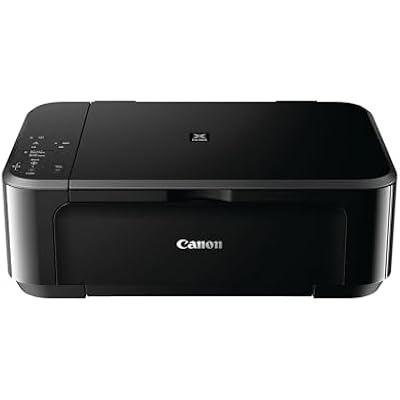
Canon PIXMA MG MG3620 Inkjet Multifunction Printer - Color
商品#:
88002132
TWD 5859
Price Details
Excluding Shipping & Custom charges ( Shipping and custom charges will be calculated on checkout )
*All items will import from 美國
0 ratings
撰寫評論
有存貨
 從USA商店匯入
QTY:
立即訂購並活動它 週四, 七月 23
Secured transaction
Ubuy works hard to protect your security and privacy. Our advanced payment security system ensures confidentiality by encrypting your information during transmission using AES (Advanced Encryption Standards) and SSL (Secure Socket Layer) protocols. Your payment details are 100% secure as we do not share your payment details with third party sellers.
Our Top Logistics Partners


Print documents and web pages with fast speeds and vibrant colors.

Fast
Shipping

Free
Return*

Secure Packaging

100% Original Products

PCI DSS Compliance

ISO 27001 Certified


What Stands Out
Wireless Printing
Print from anywhere in your home or office using Wi-Fi connectivity, allowing for seamless operation with smartphones, tablets, and laptops without complicated setups.
Multifunctional Design
Combine printing, scanning, and copying in one compact machine, enhancing productivity and saving space while efficiently managing multiple tasks for home or small office use.
High-Quality Color
Produce vibrant, high-resolution prints with advanced ink technology, ensuring sharp text and stunning photos that meet professional standards, perfect for creative and everyday needs.
產品詳情
| Item Weight | 11.7 lbs (5.31 kg) |
Who Should Buy?

-
Home Users
Ideal for individuals needing occasional printing, scanning, and copying tasks for personal documents and photos.
-
Students
Perfect for students requiring reliable printing capabilities for essays, research papers, and study materials at home.
-
Small Offices
A cost-effective solution for small offices needing a multifunction printer for light printing, scanning, and copying tasks.

-
High Volume Printing
Not suitable for users needing to print large volumes of documents quickly due to slower print speeds.
-
Professional Photographers
May not meet the high-quality needs of professional photographers who require superior color accuracy and print quality.
-
Multi-User Environments
Less ideal for busy offices with multiple users requiring simultaneous printing due to limited connectivity options.
產品描述
Canon PIXMA MG MG3620 Inkjet Multifunction Printer - Color
有疑問? 和我們聊天
客戶問答
-
問題:
What are the key features of the Canon PIXMA MG3620 Printer?
Answer: The Canon PIXMA MG3620 is a versatile wireless inkjet multifunction printer that offers printing, scanning, and copying capabilities. It supports mobile printing via AirPrint and Google Cloud Print, making it ideal for users who require flexibility in printing from various devices. Additionally, its compact design suits small spaces, while its color printing can produce vibrant documents and photos. This printer is perfect for home or small office use, accommodating diverse printing needs like school projects, photo prints, and everyday documents. -
問題:
How do I connect the Canon PIXMA MG3620 to Wi-Fi?
Answer: To connect the Canon PIXMA MG3620 to Wi-Fi, use the built-in wireless setup utility located on the printer's control panel. Simply select your Wi-Fi network from the available list, enter the password, and the printer will connect. Once connected, download the Canon PRINT app on your smartphone to manage print jobs seamlessly. This wireless connection allows you to print from anywhere within your home network, making it convenient for multi-device households. -
問題:
What types of paper can I use with the Canon PIXMA MG3620?
Answer: The Canon PIXMA MG3620 supports a variety of paper types including plain paper, photo paper (glossy and semi-glossy), and envelopes. You can use standard sizes like letter and A4, as well as custom sizes for your printing demands. These options allow for versatility, whether you're printing documents for work, crafting beautiful photo prints, or sending personalized notes. By choosing the right paper type, you can enhance the print quality and appearance of your projects. -
問題:
Can I print photos directly from my smartphone using the MG3620?
Answer: Yes, you can print photos directly from your smartphone with the Canon PIXMA MG3620. With AirPrint for iOS devices and the Canon PRINT app for Android devices, you can easily select images from your photo gallery and send them to print wirelessly. This feature is particularly useful for preserving memories, allowing you to print professional-quality photos directly from your mobile devices without the need for a computer. -
問題:
What ink cartridges are compatible with the Canon PIXMA MG3620?
Answer: The Canon PIXMA MG3620 uses two types of ink cartridges: the Canon PG-245 black ink cartridge and the CL-246 color ink cartridge. These cartridges are available in standard and XL sizes, providing options based on your print volume needs. Using original Canon cartridges ensures optimal print quality and performance, whether you’re printing lengthy documents or vivid photographs. Plus, purchasing XL cartridges can minimize the frequency of replacements for extensive printing tasks. -
問題:
Does the Canon PIXMA MG3620 support duplex printing?
Answer: No, the Canon PIXMA MG3620 does not support automatic duplex printing. However, you can manually print on both sides by printing one side and reinserting the paper to print the other side. This method allows you to save paper, especially useful for projects that require multiple pages or documents that need to be double-sided for a professional appearance. -
問題:
How can I troubleshoot printing issues with my MG3620?
Answer: If you experience printing issues with your Canon PIXMA MG3620, start by checking the printer's connection to your Wi-Fi and ensuring it is powered on. If the printer is not responding, restart both the printer and your computer or mobile device. Additionally, ensure there are no paper jams and that ink levels are sufficient. The printer's LCD panel can provide error messages that will guide you in resolving common issues quickly. Keeping the printer's software updated can also prevent technical glitches. -
問題:
Is the Canon PIXMA MG3620 suitable for home office use?
Answer: Absolutely! The Canon PIXMA MG3620 is an excellent choice for home office use due to its multifunction capabilities, compact size, and wireless connectivity. It can efficiently handle various tasks such as printing invoices, scanning documents, and copying important papers. Its color printing capabilities make it suitable for producing high-quality presentations and reports, ensuring you maintain a professional appearance in all your printed materials. -
問題:
How do I scan documents using the Canon PIXMA MG3620?
Answer: To scan documents using the Canon PIXMA MG3620, place the document face down on the scanner bed and initiate the scanning process via the printer's control panel or through the Canon PRINT app on your device. You can choose between scanning to a computer or sending it directly to email. The scanned files can be saved in various formats, allowing for easy sharing or storage. This feature is beneficial for digitizing important paperwork or creating backups of physical documents. -
問題:
Where can I buy Canon PIXMA MG3620 Wireless Inkjet Multifunction Printer - Color?
Answer: You can buy the Canon PIXMA MG3620 Wireless Inkjet Multifunction Printer - Color from Ubuy in Taiwan. Ubuy offers a wide selection of electronic products, including printers, ensuring a reliable shopping experience with various options for customers.
Canon Ink Tank Printers Editorial Review
The reviews for this printer present a mixed but predominantly favorable user experience, showcasing its utility and functionality, particularly for users with specific needs such as connecting via USB. Customers appreciate its compatibility with Chromebooks, highlighting the convenience of immediate recognition by the system without requiring additional software downloads. Several users specifically note the printer's satisfactory performance for home printing tasks, reinforcing its appeal for everyday use. However, the feedback is not without criticism. Print quality has drawn concern, particularly for black-and-white outputs, which some users describe as subpar—characterized by blurriness and smearing. Moreover, the printer's mechanical sounds before and after printing have raised alarms for some users regarding its durability. Limitations in wireless connectivity are another recurring theme, with several customers pointing out that the wireless range is quite restricted, often necessitating a USB connection instead. On the whole, this printer serves as a practical solution for users looking for a straightforward, budget-friendly printing option, especially in environments where wireless networking is not a primary Consideration. While there are warnings regarding its print quality and setup challenges, many users find it to live up to expectations for basic home printing needs. **
Customer Reviews & Ratings
1 客戶評價
-
5 星
100%
-
4 星
0%
-
3 星
0%
-
2 星
0%
-
1 星
0%
評論這個產品
和其他客戶分享您的想法
優點
- Easy setup and immediate recognition by devices (especially Chromebooks).
- Affordable and generally offers good print quality for basic home tasks.
- Portable and convenient for travel usage.
缺點
- Mechanical noises during operation raise durability concerns.
Product Price History
重要資訊
- 限制:對於國際運輸的產品,請注意任何製造商保修可能無效;製造商服務選項可能不可用;產品手冊、說明和安全警告可能不是目的地國家的語言;產品(及隨附材料)的設計可能不符合目的地國家的標準、規範和標籤要求;並且產品可能不符合目的地國家的電壓和其他電氣標準(如果適用,需要使用適配器或轉換器)。收件人有責任確保產品可以合法進口到目的地國家。當從Ubuy或其關聯公司訂購時,收件人是記錄在案的進口人,並且必須遵守目的地國家的所有法律和法規。
- 由於Ubuy是一個全球搜索引擎,因此並非Ubuy上列出的所有產品都在出售。產品受出口/貿易法規的約束。
TWD 5859
立即訂購並活動它 週四, 七月 23
This item is not restrict in my country.(Please click on above link if this item is not restrict in your country, So our team will review and allow.)
QTY:
Secured transaction
Ubuy works hard to protect your security and privacy. Our advanced payment security system ensures confidentiality by encrypting your information during transmission using AES (Advanced Encryption Standards) and SSL (Secure Socket Layer) protocols. Your payment details are 100% secure as we do not share your payment details with third party sellers.
Our Top Logistics Partners
Fastest cross-border delivery
特色和優勢
- Combines dye ink for vivid colors with black pigment ink for sharp text.
- Delivers fast printing speeds for efficient document handling.
- Patented printhead technology fires ink droplets as small as 2pl.
- Achieves maximum color resolution of 4800 x 1200 dpi.
- Ideal for both home and office environments.
- Built-in wireless capability for easy connectivity.