- 主頁 /
- 電子產品 /
- Computer Accessories /
- Computer Accessories & Peripherals /
- Input Devices /
- Touch Pads /
- Bluetooth Touchpad Multi-Function Gestures Wi...


商品#:
104662236
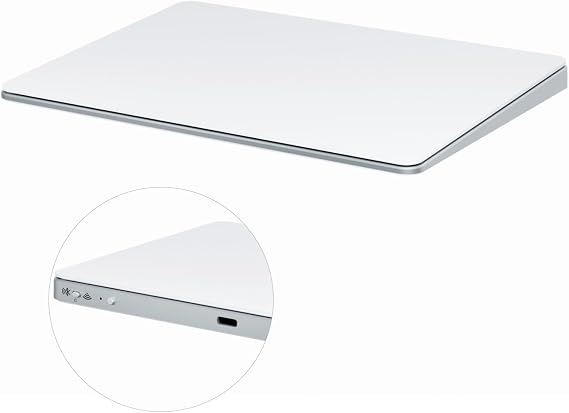
Bluetooth Touchpad Multi-Function Gestures Wireless Trackpad Rechargeable for Windows OSX/Laptop/PC (Silver)
商品#:
104662236
TWD 2566
Price Details
Excluding Shipping & Custom charges ( Shipping and custom charges will be calculated on checkout )
*All items will import from 美國
0 ratings
撰寫評論
有存貨
 從USA商店匯入
立即訂購並活動它 Monday, 八月 24
Secured transaction
Ubuy works hard to protect your security and privacy. Our advanced payment security system ensures confidentiality by encrypting your information during transmission using AES (Advanced Encryption Standards) and SSL (Secure Socket Layer) protocols. Your payment details are 100% secure as we do not share your payment details with third party sellers.
Our Top Logistics Partners


Ergonomically designed with a tempered glass touch surface for a seamless gesture control experience, this trackpad is the perfect companion for your PC or laptop.

Fast
Shipping

Free
Return*

Secure Packaging

100% Original Products

PCI DSS Compliance

ISO 27001 Certified


What Stands Out
Multi-Function Gestures
Offers a wide array of multi-touch gestures that enhance productivity and streamline navigation, providing a seamless user experience for both Windows and OSX users.
Rechargeable Design
Features a convenient rechargeable battery that eliminates the need for constant battery replacements, ensuring longer usage and environmental friendliness.
Versatile Compatibility
Designed to work effortlessly with various devices including laptops and PCs, making it an ideal accessory for users across different platforms seeking efficiency and versatility.
產品詳情
| Brand | Zexxivop |
| Model Name | K304 |
| Built-In Media | 1 x Laptop Cooling Pad |
| Model Number | K304 |
| Specific Uses For Product | General computing tasks |
| UPC | 728094607058 |
| Style Name | Minimalist Modern |
| Manufacturer | Shenzhen Hongjiayi Electronics Co., Ltd |
| Size | 16cm * 11.5cm * 1cm |
| Mfr Part Number | K304 |
| Unit Count | 1.0 Count |
| Hardware Interface | Bluetooth, Multipronged Audio |
| Wireless Technology | Bluetooth |
| Connectivity Technology | Bluetooth, 2.4G |
| Wireless Compability | 802.11b, 802.11g, 802.11n |
| Camera Description | No camera |
| Operating System | Windows |
| Color | Silver |
| Item Weight | 0.16 Kilograms |
| Item Dimensions L x W x Thickness | 6.3"L x 4.53"W x 0.39"Th (16 x 11.5 x 1 cm) |
| Human-Interface Input | Touchscreen |
| Graphics Description | Integrated |
| Compatible Devices | Computer |
| Operating System Family | Windows |
| Screen Size | 7.65 Inches (19.4 cm) |
| Display Type | LCD |
| Native Resolution | 1366x768 pixels |
| Aspect Ratio | 1:1 |
| Battery Average Life | 18 days |
| Battery Capacity | 500 Milliamp Hours |
| Battery Cell Type | Lithium Ion |
| Battery Power | 1.85 Watt Hours |
| Lithium-Battery Energy Content | 1.85 Watt Hours |
| Processor Description | Low-end processor (exact model not specified) |
| Other Special Features of the Product | Foldable, Portable |
Who Should Buy?

-
Frequent Travelers
Lightweight and portable, this trackpad is ideal for users who work on-the-go and need a compact solution.
-
Mac Users
Compatible with OSX, Mac users will benefit from seamless integration and multi-touch gestures for ease of use.
-
Design Professionals
Graphic designers can utilize precise gestures and touch controls for enhanced workflow while using creative software.

-
Gaming Enthusiasts
Gamers may find this trackpad lacks the necessary precision and speed required for competitive gaming environments.
產品描述
Bluetooth Touchpad Multi-Function Gestures Wireless Trackpad Rechargeable for Windows OSX/Laptop/PC (Silver)
有疑問? 和我們聊天
客戶問答
-
問題:
What devices are compatible with the Bluetooth Touchpad Multi-Function Gestures Wireless Trackpad?
Answer: The Bluetooth Touchpad is compatible with a variety of devices, including laptops and PCs running both Windows OS and macOS. This versatility allows users to enjoy multi-function gestures and a wireless connection across different platforms, making it ideal for both casual users and professionals. For example, if you have a Windows laptop and an Apple desktop, you can seamlessly switch the trackpad between the two setups, enhancing your productivity. -
問題:
How do I charge the Bluetooth Touchpad?
Answer: Charging the Bluetooth Touchpad is simple and convenient. It comes with a rechargeable battery and uses a USB-C charging port. To charge it, simply connect the provided cable to a power source, and the trackpad will charge rapidly. Many users appreciate this feature, as it eliminates the need for disposable batteries and allows for hassle-free usage. Typically, you'll find that a full charge can last for weeks depending on usage. -
問題:
What gesture controls does the Bluetooth Touchpad support?
Answer: This trackpad supports a variety of gesture controls that enhance your navigation experience. Users can perform functions like scrolling, zooming, and swiping through applications with simple finger movements. For instance, a three-finger swipe can be used to switch between applications on Windows, making multitasking much more efficient. This is especially useful for creative professionals who rely on quick access to tools and features. -
問題:
Is it difficult to set up the Bluetooth Touchpad?
Answer: Setting up the Bluetooth Touchpad is straightforward and user-friendly. Simply turn on the trackpad, enable Bluetooth on your device, and pair them by selecting the trackpad from the list of available devices. The process takes only a few minutes. Users often appreciate how intuitive this setup is, especially those new to Bluetooth devices. Once paired, the trackpad is ready for immediate use. -
問題:
Can I customize the gestures on the Bluetooth Touchpad?
Answer: Yes, many Bluetooth Touchpads, including this model, come with customizable gesture settings. You can often download accompanying software or access system settings to tailor gestures to meet your needs. For example, if you frequently use specific applications, you can set customized gestures to open them directly. This versatility allows users to personalize their experience, creating shortcuts for efficiency. -
問題:
What are the benefits of using a wireless trackpad over a traditional mouse?
Answer: Using a wireless trackpad offers several advantages over traditional mice. First, it provides a more compact solution, reducing desk clutter. Second, gestural navigation can often be quicker for tasks like scrolling and zooming. Users in design or editing fields often find trackpads more conducive for creative tasks that require precision, such as photo editing or graphic design work, thanks to their smooth surface and advanced gesture support. -
問題:
How does the sensitivity of the Bluetooth Touchpad compare to that of a mouse?
Answer: The sensitivity of the Bluetooth Touchpad is designed to be responsive and precise, often on par with or even surpassing that of a standard mouse. This ensures that users can navigate with precision whether they're working on graphic design or gaming. Many users find that the touch responsiveness allows for quicker interactions, particularly for tasks involving multi-finger gestures, which is not possible with a traditional mouse. -
問題:
What color options are available for the Bluetooth Touchpad?
Answer: While this specific model is available in a sleek silver finish, many brands often offer various colors to match different setups. If you prefer a unique aesthetic for your workspace, you might explore other models that offer colors like black, white, or even vibrant hues. This allows you to complement the look of your laptop or desktop setup, adding a personal touch to your workspace. -
問題:
Can multiple users connect to the Bluetooth Touchpad?
Answer: Typically, Bluetooth devices can be paired with multiple systems, but only one connection can be active at a time. This means that if you're working in a shared environment, one user can connect their device while others may need to disconnect first. This feature is particularly useful in office settings where multiple users might want to use the same trackpad, allowing easy sharing without physical connections. -
問題:
Where can I buy the Bluetooth Touchpad Multi-Function Gestures Wireless Trackpad?
Answer: You can buy the Bluetooth Touchpad Multi-Function Gestures Wireless Trackpad Rechargeable for Windows OSXLaptopPC Silver at Ubuy. Ubuy is known for its extensive selection of tech gadgets and accessories, ensuring that you have access to various products, including this trackpad. Whether you're looking for additional features or related peripherals, Ubuy provides an easy shopping experience tailored to your needs.
Zexxivop Touch Pads K304 Editorial Review
未找到編輯評論
Customer Reviews & Ratings
1 客戶評價
-
5 星
100%
-
4 星
0%
-
3 星
0%
-
2 星
0%
-
1 星
0%
評論這個產品
和其他客戶分享您的想法
優點
- Easy to use multi-function gestures
- Supports Windows and Mac systems
- Rechargeable battery for convenience
- Sleek design is visually appealing
- Compact size for easy portability
缺點
- Touchpad sensitivity may require adjustment.
Platform Trust & Buyer Confidence

MA
Mohammad
Verified buyer
“Excellent quality and original too,when ubuy send original things I will appreciate that ,I very satisfied thank you”
23 July 2026 · via Trustpilot
CK
Chitra
Verified buyer
“The order and delivery progress was communicated very well. Package arrived within the estimated time. Products arrived as expected in good condition.”
22-Jul-26 · via Trustpilot
K
kund
Verified buyer
“Good supply of products. Safe payment methods, and shipment worldwide! Genuine products.”
23-Jul-26 · via Trustpilot
OO
Onesi
Verified buyer
“Was my first time buying a product from Ubuy, but I found it so helpful. This is reliable. Gonna place a new order!”
22 July 2026 · via Trustpilot
SJ
SAO JOHN
Verified buyer
“Ubuy is a great online platform to buy stuff. Reliable, fast delivery time and great value for money. I've been using Ubuy online shopping platform for three years now and will continue to do so.”
23 July 2026 · via Trustpilot
安全結帳
Global Delivery
Easy Returns
Genuine Products
Product Price History
重要資訊
- 限制:對於國際運輸的產品,請注意任何製造商保修可能無效;製造商服務選項可能不可用;產品手冊、說明和安全警告可能不是目的地國家的語言;產品(及隨附材料)的設計可能不符合目的地國家的標準、規範和標籤要求;並且產品可能不符合目的地國家的電壓和其他電氣標準(如果適用,需要使用適配器或轉換器)。收件人有責任確保產品可以合法進口到目的地國家。當從Ubuy或其關聯公司訂購時,收件人是記錄在案的進口人,並且必須遵守目的地國家的所有法律和法規。
- 由於Ubuy是一個全球搜索引擎,因此並非Ubuy上列出的所有產品都在出售。產品受出口/貿易法規的約束。
TWD 2566
立即訂購並活動它 Monday, 八月 24
This item is not restrict in my country.(Please click on above link if this item is not restrict in your country, So our team will review and allow.)
QTY:
Secured transaction
PCI DSS compliant and ISO 27001:2022 certified, with encrypted payments and full buyer protection on every order.
Our Top Logistics Partners
Fastest cross-border delivery
特色和優勢
- Ergonomically designed for superior comfort during use.
- Tempered glass surface enhances touch responsiveness.
- Supports PC, Desktop, and Laptop with macOS and Windows compatibility.
- Battery life lasts up to 15 days with 2-3 hours of continuous use.
- Features gesture control; no left/right pressing functionality.
- Includes trackpad, manual, cable, 2.4G receiver, and USB to type-C connector.
Ubuy Assurance
Experience worry-free shopping with 100% original products, PCI DSS-compliant payment security, ISO 27001-certified data protection, the fastest cross-border delivery, free returns *, and secure packaging on every order.