0 ratings


商品#:
43698670
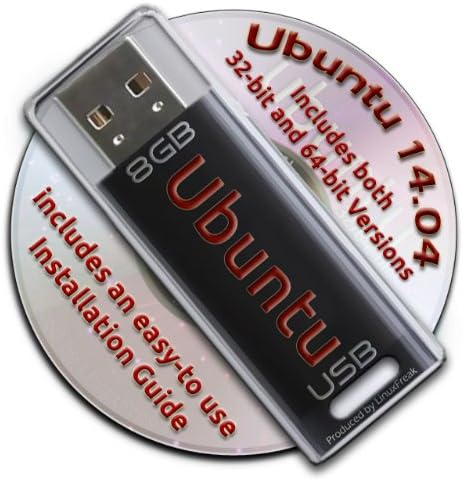
Ubuntu Linux 14.04 Bootable 8GB USB Flash Drive - Contains Both 32-bit and 64-bit.
73% of respondents would recommend this to a friend
商品#:
43698670
TWD 1266
Price Details
Excluding Shipping & Custom charges ( Shipping and custom charges will be calculated on checkout )
*All items will import from 美國
0 ratings
撰寫評論
有存貨
 從USA商店匯入
立即訂購並活動它 Sunday, 九月 27
Secured transaction
Ubuy works hard to protect your security and privacy. Our advanced payment security system ensures confidentiality by encrypting your information during transmission using AES (Advanced Encryption Standards) and SSL (Secure Socket Layer) protocols. Your payment details are 100% secure as we do not share your payment details with third party sellers.
Our Top Logistics Partners


Now you can take your Ubuntu installation with you anywhere, and always have your own O/S on any PC you use!

Fast
Shipping

Free
Return*

Secure Packaging

100% Original Products

PCI DSS Compliance

ISO 27001 Certified



What Stands Out
Dual Architecture
Includes both 32-bit and 64-bit versions, ensuring compatibility with a wide range of hardware setups, making it a versatile choice for all users.
Bootable Ready
Preloaded with Ubuntu 14.04, the USB drive is ready to boot immediately, offering a hassle-free setup to users wanting to experiment or install Linux.
Portable Convenience
The compact 8GB size makes it easy to carry, allowing users to have Ubuntu on-the-go, ideal for troubleshooting or secure computing on any compatible machine.
產品詳情
| Item Weight | 3 ounces (85.05 grams) |
| Date First Available | April 18, 2014 |
| Manufacturer | LinuxFreak |
Who Should Buy?

-
Linux Beginners
Ideal for users new to Linux wanting an easy installation process without needing additional technical skills.
-
Portable OS Users
Great for those needing a lightweight operating system that can be run from USB on multiple computers.
-
System Recovery
Useful for users wanting to troubleshoot or recover data from a non-booting computer using a live USB.

-
Windows Users
Not suitable for users who primarily use Windows and have no interest in transitioning to a Linux environment.
產品描述
Ubuntu Linux 14.04 Bootable 8GB USB Flash Drive - Contains Both 32-bit and 64-bit.
有疑問? 和我們聊天
客戶問題與解答
-
問題:
What is included on the Ubuntu Linux 14.04 Bootable USB Flash Drive?
Answer: The Ubuntu Linux 14.04 Bootable USB Flash Drive comes pre-loaded with both the 32-bit and 64-bit versions of the Ubuntu operating system. This gives users the flexibility to choose the version that best fits their hardware capabilities. Additionally, the USB drive is formatted to be bootable, allowing for straightforward installation on compatible devices without the need for additional setup. Whether you're revamping an older computer or setting up a new system, this USB drive is a practical solution. -
問題:
How do I create a bootable USB drive with Ubuntu Linux 14.04?
Answer: Creating a bootable USB drive with Ubuntu Linux 14.04 is a straightforward process. Simply plug the USB drive into your computer, and during the boot-up sequence, access the BIOS or boot menu. From there, you’ll select the USB drive as the boot device. The USB contains installation files that will lead you through the setup process. This method is efficient for installing Ubuntu on various machines quickly, so it's especially useful for system administrators or users managing multiple installations. -
問題:
Is Ubuntu Linux 14.04 suitable for older hardware?
Answer: Yes, Ubuntu Linux 14.04 is particularly suitable for older hardware. Its lightweight design allows it to run smoothly on systems with lower specifications, making it an excellent choice for revitalizing older computers. Unlike some modern operating systems that require more resources, Ubuntu 14.04 can comfortably operate on machines with limited RAM and processing power, thereby extending the useful life of older devices. -
問題:
What are the key features of Ubuntu Linux 14.04?
Answer: Ubuntu Linux 14.04 offers a rich set of features, including a user-friendly interface, improved performance, and robust security enhancements. The long-term support (LTS) status of this version means that it receives essential updates and support for an extended period. Features like the Unity desktop environment, compatibility with a wide range of hardware, and a vast repository of software applications greatly enhance user experience. This makes it ideal for both personal and professional use. -
問題:
Can I use this USB drive for persistent storage?
Answer: Yes, you can utilize the Ubuntu Linux 14.04 Bootable USB Flash Drive for persistent storage, allowing you to save files and settings between sessions. Persistent storage enables you to keep installed applications and personal files, making the USB drive a flexible, portable solution for running Ubuntu. This is especially handy for individuals who need a reliable operating system on the go, whether for work or study. -
問題:
What should I do if I encounter issues booting from the USB drive?
Answer: If you experience issues booting from the USB drive, first ensure that your computer is set to boot from USB in the BIOS settings. Double-check the connection and try using a different USB port if necessary. If the problem persists, the USB may need to be reformatted as a bootable drive again. Refer to the installation instructions that come with the USB or visit official Ubuntu documentation for troubleshooting tips to resolve common boot-related challenges. -
問題:
Is Ubuntu Linux 14.04 safe to use?
Answer: Yes, Ubuntu Linux 14.04 is considered safe to use. The operating system is built with security in mind, featuring a robust permissions system and firewall. Regular security updates from the Ubuntu community help to protect users from vulnerabilities. Additionally, being open-source allows its code to be scrutinized by developers around the world, contributing to a more secure environment. This makes it a reliable choice for users who prioritize security in their computing activities. -
問題:
Can I run this Ubuntu version on a virtual machine?
Answer: Absolutely! You can run Ubuntu Linux 14.04 on a virtual machine by using virtualization software such as VirtualBox or VMware. Simply create a new virtual machine, allocate resources such as RAM and disk space, and choose the USB drive as the boot medium. This is particularly useful for developers or testers who need to experiment with different operating systems without altering their main system. -
問題:
What are the system requirements for Ubuntu Linux 14.04?
Answer: The system requirements for Ubuntu Linux 14.04 are quite modest, which is one reason for its popularity among users with older hardware. You need at least a 1 GHz processor, 1 GB of RAM, and around 5 GB of free disk space. However, for optimal performance, especially with the graphical interface, it is recommended to have 2 GB of RAM. This makes it accessible for a wide range of computers, from older desktops to newer laptops. -
問題:
Where can I buy Ubuntu Linux 14.04 Bootable 8GB USB Flash Drive?
Answer: You can buy the Ubuntu Linux 14.04 Bootable 8GB USB Flash Drive from Ubuy in Taiwan. Ubuy provides a convenient platform for ordering tech products, ensuring that you receive a reliable and usable bootable drive directly to your location. This makes it easier for customers looking to upgrade their systems or try out Ubuntu for the first time.
LinuxFreak USB Flash Drives Editorial Review
The Ubuntu Linux 14.04 Bootable 8GB USB Flash Drive contains a 32-bit and 64-bit Ubuntu system in a bootable format. The USB flash drive is the device that delivers the OS. You can boot up Ubuntu and try it without installation or install it on your hard drive. Do note, any changes made while using the OS will be lost when you shut down. So, when installing, users must partition their hard drive or risk overwriting their current operating system. However, it seems Ubuntu doesn't work on some devices, so users will need to check for compatibility before purchase. It is said to be a useful tool for those seeking a quick solution for bootable Ubuntu, and it's cheaper than buying a separate USB flash drive and creating your own bootable drive.
Customer Reviews & Ratings
1 客戶評價
-
5 星
100%
-
4 星
0%
-
3 星
0%
-
2 星
0%
-
1 星
0%
評論這個產品
和其他客戶分享您的想法
優點
- Contains both 32-bit and 64-bit Ubuntu system
- Bootable format
- Comes with the means for installation
- Cheaper than buying a separate USB flash drive and creating your own bootable drive
缺點
- Results vary with different OS's on the computers used to boot up Ubuntu
Platform Trust & Buyer Confidence

JK
Jasmin
Verified buyer
“Great products and very good service: very easy and very fast international delivery.”
9 September 2026 · via Trustpilot
AG
Anke
Verified buyer
“Wonderful online shopping experience, smooth transaction from the start. Payment method works conveniently and delivery is unexpectedly fast and reliable. You go the extra mile for service. What makes this even more amazing, you deliver to Namibia. I will remain a happy Ubuy customer and will increase my purchases for sure! Thank you!”
10 September 2026 · via Trustpilot
H
Hazel
Verified buyer
“Very easy to find the products what you need, and so fast delivery, that’s why I highly recommended to others costumers to used ubuy.”
10 September 2026 · via Trustpilot
O
Opaleye
Verified buyer
“I received exactly what I ordered I was skeptical about your site because that was my first time to order. But the order came timely and neatly packaged. I was not disappointed. Thank you.”
11 September 2026 · via Trustpilot
AC
Adele
Verified buyer
“Easy to find and order what you want on the website. Delivery is quick to the UK”
8 September 2026 · via Trustpilot
安全結帳
Global Delivery
Easy Returns
Genuine Products
Product Price History
重要資訊
- 限制:對於國際運輸的產品,請注意任何製造商保修可能無效;製造商服務選項可能不可用;產品手冊、說明和安全警告可能不是目的地國家的語言;產品(及隨附材料)的設計可能不符合目的地國家的標準、規範和標籤要求;並且產品可能不符合目的地國家的電壓和其他電氣標準(如果適用,需要使用適配器或轉換器)。收件人有責任確保產品可以合法進口到目的地國家。當從Ubuy或其關聯公司訂購時,收件人是記錄在案的進口人,並且必須遵守目的地國家的所有法律和法規。
- 由於Ubuy是一個全球搜索引擎,因此並非Ubuy上列出的所有產品都在出售。產品受出口/貿易法規的約束。
TWD 1266
立即訂購並活動它 Sunday, 九月 27
This item is not restrict in my country.(Please click on above link if this item is not restrict in your country, So our team will review and allow.)
QTY:
Secured transaction
PCI DSS compliant and ISO 27001:2022 certified, with encrypted payments and full buyer protection on every order.
Our Top Logistics Partners
Fastest cross-border delivery
特色和優勢
- Preinstalled USB stick for easy booting of Ubuntu Linux.
- Includes both 32-bit and 64-bit versions.
- Award-winning Linux OS with a complete set of applications.
- Lifetime free updates and multi-language support included.
- Comes with a productivity suite, web browser, and multimedia tools.
- Easy-to-follow installation guide included with pictures.
Ubuy Assurance
Experience worry-free shopping with 100% original products, PCI DSS-compliant payment security, ISO 27001-certified data protection, the fastest cross-border delivery, free returns *, and secure packaging on every order.