






商品#:
36733263
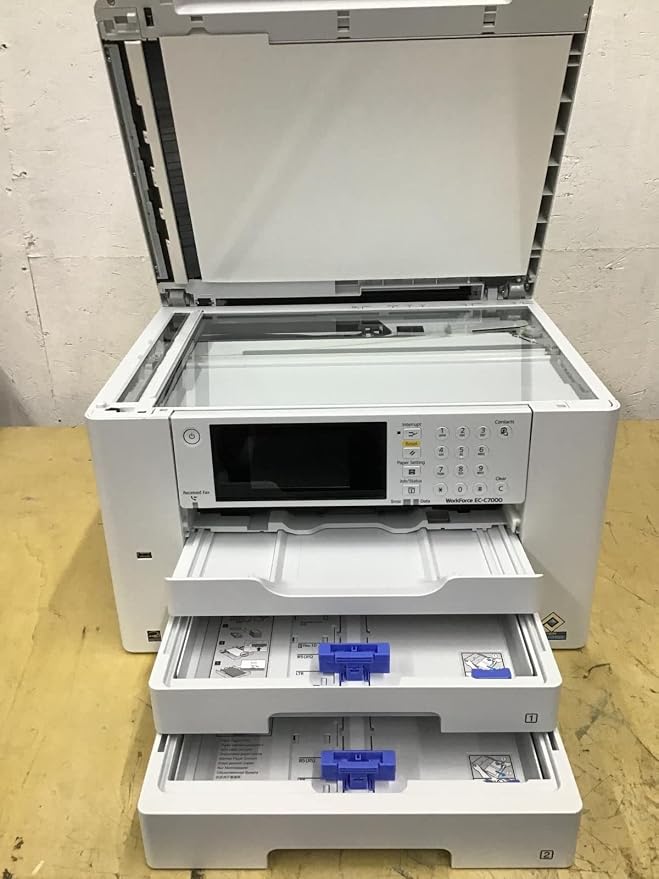
Epson Workforce EC-C7000 Color All-in-One Printer (C11CH67202)
89% of respondents would recommend this to a friend
商品#:
36733263
TWD 12985
Price Details
Excluding Shipping & Custom charges ( Shipping and custom charges will be calculated on checkout )
*All items will import from 美國
0 ratings
撰寫評論
有存貨
 從USA商店匯入
QTY:
庫存僅剩 1 件商品。
立即訂購並活動它 Sunday, 六月 28
Secured transaction
Ubuy works hard to protect your security and privacy. Our advanced payment security system ensures confidentiality by encrypting your information during transmission using AES (Advanced Encryption Standards) and SSL (Secure Socket Layer) protocols. Your payment details are 100% secure as we do not share your payment details with third party sellers.
Our Top Logistics Partners


Enhance workplace productivity with the fast, reliable WorkForce EC-C7000, offering high-speed printing up to 13 x 19 and professional-quality prints

Fast
Shipping

Free
Return*

Secure Packaging

100% Original Products

PCI DSS Compliance

ISO 27001 Certified


What Stands Out
Versatile Functionality
This all-in-one printer offers printing, scanning, and copying capabilities, making it an ideal choice for small businesses seeking a comprehensive solution for diverse office tasks.
Fast Printing Speed
With impressive print speeds of up to 25 pages per minute, the EC-C7000 enhances productivity, minimizing downtime and enabling quick turnaround for high-volume printing needs in busy environments.
High-Quality Prints
Utilizing PrecisionCore technology, this printer delivers vibrant color output and sharp text, ensuring professional-quality documents and marketing materials for businesses looking to make a lasting impression.
產品詳情
- All-in-one printer with printing, copying, and scanning capabilities
- 4.3 touchscreen for easy task management
- Resolution quality up to 4800 x 2400 dpi for excellent readability
- Supports various media types including plain paper, glossy photo paper, and envelopes
- Print speed of 25 ppm in black/white and 12 ppm in color, with automatic duplex printing
- Meets ENERGY STAR, EMC, RoHS, and other industry standards
| Printer Type | Laser |
| Other Special Features of the Product | Lan,Star |
| Printer Output Type | Color |
| Item Weight | 45.4 Pounds (20.59 kg) |
| Item Dimensions D x W x H | 1"D x 1"W x 1"H (2.5 x 2.5 x 2.5 cm) |
| Controller Type | Touchscreen |
| Print media | Paper (plain) |
| Scanner Type | Automatic Document Feeder (ADF) |
| Maximum Copy Speed Black and White | 25 ppm |
| Compatible Devices | Smartphones |
| EU Spare Part Availability Duration | 2 Years |
| Maximum Copies Per Run | 25 |
| Ink Color | Black, Cyan, Magenta, Yellow |
| Additional Printer Functions | All In One |
| Control Method | Remote |
| Compatible Cartridge | Epson ink cartridges with part numbers T812120-S, T812220-S, T812320-S, T812420-S, T812XXL, T812XL120-S, T812XL220-S, T812XL320-S, T812XL420-S |
| Number of Trays | 3 |
| Processor Count | 1 |
| Number of Drivers | 1 |
| Resolution | 4800 x 2400 |
| Display Type | LCD |
| Color | White |
| Color Depth | 24 bpp |
| Printer Connectivity Type | Wi-Fi |
| Hardware Interface | USB |
| Number of Ethernet Ports | 1 |
| Total USB 2.0 Ports | 1 |
| Total Usb Ports | 1 |
| Brand | Epson |
| Model Name | EC C7000 |
| Model Number | EC C7000 |
| Built-In Media | Envelopes |
| Series Number | 7000 |
| Model Series | EC C7000 |
| Specific Uses For Product | business |
| UPC | 010343956605 |
| Manufacturer | Epson America Print |
| Item Type Name | Color Laser Printer |
| Color Pages per Minute | 12 ppm |
| B&W Pages per Minute | 25 ppm |
| Initial Page Print Time | [EST] 2.4 seconds (black) / 4.2 seconds (color) |
| Maximum Media Size | 11 x 17 inch (27.9 cm) |
| Maximum Sheet Capacity | 50 |
| Paper Size | 13 inch x 19 (33 cm) |
| Output sheet capacity | 50 |
| Maximum print Resolution Color | 4800 x 2400 |
| Maximum Print Resolution Black and White | 4800 x 2400 |
| Dual-sided printing | Yes |
| Duplex | Automatic |
| Maximum Copy Resolution Color | 4800 x 2400 dpi |
| Maximum Copy Resolution Black and White | 1200 x 2400 dpi |
| Connectivity Technology | Wi-Fi |
| Printing Technology | Laser |
| Special Feature | Lan,Star |
| Printer Output | Color |
| Maximum Print Speed (Color) | 12 ppm |
| Max Printspeed Monochrome | 25 ppm |
What's in the box
Envelopes
Who Should Buy?

-
Small Businesses
Ideal for small businesses needing a reliable printer for high-quality color documents and cost-effective printing solutions.
-
Home Offices
Great choice for home office users wanting multifunctionality and efficiency for printing, scanning, and copying tasks.
-
Creative Professionals
Perfect for graphic designers and photographers requiring vivid color quality and precision in document and photo printing.

-
High Volume Users
May not be suitable for businesses with extremely high-volume printing needs due to slower print speeds.
-
Budget-Conscious Consumers
Not ideal for users looking for the cheapest printing solution, as initial costs are higher compared to basic printers.
-
Occasional Users
Not recommended for users who print infrequently, as maintenance and ink costs can become burdensome over time.
產品描述
有疑問? 和我們聊天
客戶問答
-
問題:
What are the main features of the Epson Workforce EC-C7000 printer?
Answer: The Epson Workforce EC-C7000 is a versatile all-in-one printer featuring print, copy, scan, and fax capabilities. It utilizes PrecisionCore technology for high-quality prints with crisp colors and sharp text. The printer supports a variety of media sizes and types, making it ideal for both professional documents and creative projects. With wireless connectivity options, mobile printing, and robust security features, it is designed for small businesses and workgroups that require efficiency and reliability. -
問題:
Can the Epson Workforce EC-C7000 printer handle large print jobs?
Answer: Yes, the Epson Workforce EC-C7000 is specifically designed to manage large print jobs effectively. It has a high-capacity paper tray that can hold a significant number of sheets, and its robust ink system ensures consistent quality across pages. This makes it suitable for businesses that frequently require printing of reports, presentations, or marketing materials without sacrificing speed or print fidelity. -
問題:
Is the Epson Workforce EC-C7000 compatible with mobile printing?
Answer: Absolutely! The Epson Workforce EC-C7000 supports mobile printing through various platforms, including Apple AirPrint, Google Cloud Print, and the Epson iPrint app. Users can print directly from their smartphones, tablets, or laptops, allowing for convenient access to documents while on the go. This feature is especially beneficial for busy professionals needing to print from different locations. -
問題:
What type of media can I use with the Epson Workforce EC-C7000?
Answer: The Epson Workforce EC-C7000 is compatible with a broad range of media types, including plain paper, photo paper, glossy paper, and envelopes. It can handle various sizes, from standard letter-sized sheets to larger formats, making it an excellent choice for printing everything from everyday documents to high-quality presentations and marketing materials. -
問題:
How does the Epson Workforce EC-C7000 compare to previous Workforce models?
Answer: The Epson Workforce EC-C7000 offers significant upgrades over previous models, including improved print speeds, enhanced image quality with PrecisionCore technology, and better energy efficiency. Additionally, its compact design and advanced features cater to the needs of small to medium-sized businesses, making it a modern solution for diverse printing requirements. -
問題:
What is the ink system used in the Epson Workforce EC-C7000?
Answer: The Epson Workforce EC-C7000 utilizes a four-color ink cartridge system (Cyan, Magenta, Yellow, and Black) that delivers vibrant prints and sharp text. The cartridges are designed for high yield, meaning less frequent replacements and reduced printing costs over time. This efficient ink system is ideal for businesses aiming to maintain quality while managing budget effectively. -
問題:
What are the connectivity options available on the Epson Workforce EC-C7000?
Answer: The Epson Workforce EC-C7000 offers multiple connectivity options, including USB, Ethernet, and wireless connections. It supports network printing and is compatible with various operating systems and devices. This versatility allows users to integrate the printer seamlessly into existing office networks, facilitating collaboration and productivity. -
問題:
Is the Epson Workforce EC-C7000 suitable for home use as well as office use?
Answer: Yes, while the Epson Workforce EC-C7000 is tailored for office environments, it also serves well for home use, especially for users who need high-quality color printing. Its wide array of features makes it a great fit for graphic designers, photographers, and anyone who appreciates superior print quality at home. The multifunctionality allows it to accommodate diverse printing tasks. -
問題:
What maintenance is required for the Epson Workforce EC-C7000?
Answer: Maintaining the Epson Workforce EC-C7000 involves regular print head cleaning and ensuring the ink cartridges are replaced when low. Keeping the printer in a clean environment and periodically checking for firmware updates can also enhance performance. By following these simple maintenance steps, users can ensure the longevity and efficiency of their printer. -
問題:
Where can I buy the Epson Workforce EC-C7000 Color All-in-One Printer C11CH67202?
Answer: You can buy the Epson Workforce EC-C7000 Color All-in-One Printer C11CH67202 on Ubuy in Taiwan. Ubuy offers a reliable platform for purchasing electronics, including the Epson printer, along with various payment options and customer support to assist you with your purchase.
Epson Laser Printers EC C7000 Editorial Review
The Epson Workforce EC-C7000 Color All-in-One Printer has garnered mixed reviews from users, with notable strengths and weaknesses impacting overall customer satisfaction. Users praise the printer for its exceptional color quality and vibrant pigments, making it particularly suitable for tasks that demand high-quality prints. It is also relatively easy to set up, which many users found appealing. The ability to print in larger formats, specifically 11x17 inches, is also a significant advantage noted by customers who require larger media options for their projects. However, the experience is marred by significant concerns regarding ink Consumption and availability. Customers report that the ink provided with the printer runs out quickly—often after printing under 200 pages—raising frustrations over ongoing ink costs. Users emphasized that it is crucial to use Epson's proprietary ink, as third-party options do not work effectively with this model, contributing to additional expenses and frustration. Some customers found the printer unreliable, experiencing frequent troubleshooting and mechanical issues that hindered their workflow. Notably, the specifications mention laser printing technology, which was misleading as the product operates on inkjet technology, causing confusion and dissatisfaction among users. Overall, while the Epson Workforce EC-C7000 has impressive printing capabilities, concerns about maintenance, reliability, and ink dependency draw a mixed response from the customer base. **
Customer Reviews & Ratings
10 客戶評價
-
5 星
53%
-
4 星
18%
-
3 星
13%
-
2 星
10%
-
1 星
6%
評論這個產品
和其他客戶分享您的想法
優點
- Excellent color quality and pigment accuracy
- Easy to set up and operate
- Ability to print on larger formats (11x17 inches)
缺點
- High ink Consumption, running out quickly
Related Categories
Related Brands
Product Price History
重要資訊
- 限制:對於國際運輸的產品,請注意任何製造商保修可能無效;製造商服務選項可能不可用;產品手冊、說明和安全警告可能不是目的地國家的語言;產品(及隨附材料)的設計可能不符合目的地國家的標準、規範和標籤要求;並且產品可能不符合目的地國家的電壓和其他電氣標準(如果適用,需要使用適配器或轉換器)。收件人有責任確保產品可以合法進口到目的地國家。當從Ubuy或其關聯公司訂購時,收件人是記錄在案的進口人,並且必須遵守目的地國家的所有法律和法規。
- 由於Ubuy是一個全球搜索引擎,因此並非Ubuy上列出的所有產品都在出售。產品受出口/貿易法規的約束。
TWD 12985
立即訂購並活動它 Sunday, 六月 28
This item is not restrict in my country.(Please click on above link if this item is not restrict in your country, So our team will review and allow.)
QTY:
庫存僅剩 1 件商品。
Secured transaction
Ubuy works hard to protect your security and privacy. Our advanced payment security system ensures confidentiality by encrypting your information during transmission using AES (Advanced Encryption Standards) and SSL (Secure Socket Layer) protocols. Your payment details are 100% secure as we do not share your payment details with third party sellers.
Our Top Logistics Partners
Fastest cross-border delivery