- 主頁 /
- Software /
- Operating Systems /
- Microsoft System Builder | Windws 11 Home | Intended use for new systems | Install on a new PC | Branded by Microsoft




商品#:
50534952
Microsoft System Builder | Windws 11 Home | Intended use for new systems | Install on a new PC | Branded by Microsoft
商品#:
50534952
TWD 5299
Price Details
Excluding Shipping & Custom charges ( Shipping and custom charges will be calculated on checkout )
*All items will import from 美國
有存貨
 從USA商店匯入
QTY:
庫存僅剩9件。
立即訂購並活動它 週四, 八月 27
Secured transaction
Ubuy works hard to protect your security and privacy. Our advanced payment security system ensures confidentiality by encrypting your information during transmission using AES (Advanced Encryption Standards) and SSL (Secure Socket Layer) protocols. Your payment details are 100% secure as we do not share your payment details with third party sellers.
Our Top Logistics Partners


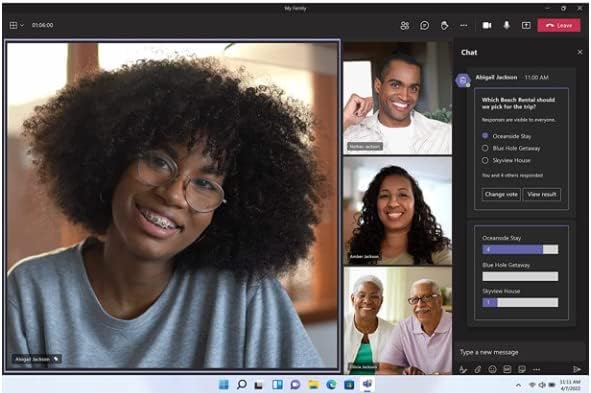
We’ve reimagined every element of the Windows 11 UX to feel effortless, personal, and focused.

Fast
Shipping

Free
Return*

Secure Packaging

100% Original Products

PCI DSS Compliance

ISO 27001 Certified



What Stands Out
New System Compatibility
Designed specifically for new PC builds, ensuring seamless installation and optimal performance on the latest hardware configurations that enhance user experience.
Genuine Microsoft Branding
Officially branded by Microsoft, guaranteeing authenticity and access to the latest updates, security features, and robust support that users trust and rely on.
User-Friendly Installation
Simplifies the setup process for novice users with guided installation, making it easy to configure their new systems without technical complications, bridging the gap for all skill levels.
產品詳情
| Product Dimensions | 7.5 x 5.5 x 0.1 inches (19.1 x 14 x 0.3 cm); 1.6 ounces (45.36 grams) |
| Item model number | KW9-00633 |
| Date First Available | December 2, 2021 |
| Manufacturer | Microsoft |
Who Should Buy?

-
New PC Builders
Ideal for individuals assembling a new computer, providing a reliable operating system for smooth performance.
-
Home Users
Perfect for everyday users who need an intuitive and user-friendly interface for personal tasks and entertainment.
-
Developers
Beneficial for developers setting up workstations, offering modern features and support for the latest application development.

-
Casual Users
May not suit individuals who require minimal or no customization and prefer operating systems pre-installed on machines.
產品描述
有疑問? 和我們聊天
客戶問題與解答
-
問題:
What is Microsoft System Builder and how does it relate to Windows 11 Home?
Answer: Microsoft System Builder refers to a version of Windows 11 Home specifically designed for OEMs and system builders. It allows users to install a fresh copy of Windows 11 on new PCs that they assemble or upgrade. This edition ensures that those building custom systems can operate with the latest features and enhanced security that Windows 11 offers. It's perfect for tech enthusiasts who want to create a tailored computing experience or for businesses setting up new workstations. -
問題:
Can I install Microsoft Windows 11 Home on hardware that I build myself?
Answer: Yes, you can install Microsoft Windows 11 Home on self-built hardware. This version is specifically aimed at new system installations, making it an ideal option for custom PC builds. When creating your system, ensure your components meet the minimum system requirements for Windows 11, which includes specific CPU, RAM, and storage specifications. Many enthusiasts and gamers choose this version to enjoy optimal performance and the latest technology advancements. -
問題:
What are the key features of Windows 11 Home?
Answer: Windows 11 Home offers several key features, including a revamped Start Menu, enhanced touch controls, and improved gaming capabilities with DirectStorage. Additionally, it supports virtual desktops and includes integrated Microsoft Teams for seamless communication. These features cater to a diverse range of users, from casual home users to gamers looking for optimized performance. The redesigned interface enhances user experience by providing a more intuitive interaction with the operating system. -
問題:
Is Microsoft System Builder Windows 11 Home suitable for gaming?
Answer: Absolutely, Microsoft System Builder Windows 11 Home is highly suitable for gaming. It includes features like DirectStorage, which reduces load times by allowing games to load assets directly from the SSD, enhancing performance. Moreover, the operating system supports gaming tools such as Xbox Game Pass, providing access to a vast library of games. This makes it a great choice for gamers who want to ensure their new systems can handle the latest titles and heavy graphics demands. -
問題:
What are the system requirements for installing Windows 11 Home?
Answer: To install Windows 11 Home, your system must meet specific requirements: a compatible 64-bit processor, 4 GB RAM, 64 GB storage, DirectX 12 compatible graphics, and support for TPM version 2.0. Additionally, a display of at least 720p resolution is necessary. Meeting these requirements ensures that Windows 11 runs efficiently, allowing users to take full advantage of its capabilities and optimizations, whether for casual use, productivity, or gaming. -
問題:
How does the installation process for System Builder Windows 11 Home work?
Answer: Installing System Builder Windows 11 Home involves creating a bootable USB drive with the Windows installation media, which you can download from the Microsoft website. Once the bootable USB is ready, insert it into your new PC and boot from it. Follow the on-screen prompts to install the operating system. This process allows you to customize installation settings and partition your drives as needed. It's important for system builders to have a clear plan for their setup before beginning the installation. -
問題:
Do I need a Microsoft account to use Windows 11 Home?
Answer: While you can set up Windows 11 Home with a local account, a Microsoft account provides additional features and benefits. With a Microsoft account, you can access services like OneDrive, sync your settings across devices, and download apps from the Microsoft Store. This is particularly beneficial for users who use multiple devices, as it allows for a seamless integration and access to various cloud services, enhancing productivity and user experience. -
問題:
Can I upgrade from Windows 10 to Windows 11 Home using System Builder?
Answer: Yes, users can upgrade from Windows 10 to Windows 11 Home using the System Builder version as long as their hardware supports the upgrade. The installation process will guide you through backing up your current data and settings, while ensuring your system meets Windows 11's requirements. This upgrade is ideal for those looking to take advantage of Windows 11's enhanced performance and user experience without needing to start fresh on a new system. -
問題:
What support options are available for System Builder Windows 11 Home?
Answer: Support for System Builder Windows 11 Home primarily comes from community forums, Microsoft's documentation, and tech enthusiast communities rather than direct customer support. Users can find a wealth of information on troubleshooting, installation guides, and performance optimization online. This setup is common among PC builders who often troubleshoot and share solutions with each other, leading to a collaborative problem-solving environment that enhances user knowledge. -
問題:
Where can I buy Microsoft System Builder Windows 11 Home?
Answer: You can purchase Microsoft System Builder Windows 11 Home from Ubuy in Taiwan. Ubuy offers a straightforward shopping experience with a secure platform, ensuring you acquire the official Microsoft software required for new PC installations. This option provides system builders and tech enthusiasts with a reliable source to get the latest Windows operating system for their custom programs, helping you to set up your system efficiently.
Microsoft Operating Systems KW9-00633 Editorial Review


Microsoft System Builder | Windows 11 Home | Intended use for new systems | Install on a new PC | Branded by Microsoft. This operating system is tailored for users building new PCs and is praised for its performance, ensuring a clean installation without bloatware. Some users have mentioned experiencing issues with the GameBar software that significantly affects gaming performance, but overall, many appreciate the seamless integration and stability that Windows 11 offers during everyday tasks. The critical note is that this version is limited to new systems, so compatibility checks are essential before installation, adding a level of security that many find reassuring.
Customer Reviews & Ratings
2577 客戶評價
-
5 星
69%
-
4 星
9%
-
3 星
5%
-
2 星
2%
-
1 星
15%
評論這個產品
和其他客戶分享您的想法
優點
- Seamless installation on new systems
- No bloatware or additional software
- Robust performance for resource-intensive tasks
- High stability during daily use
- Compatible with advanced security requirements
缺點
- Compatibility checks are essential before installation
Platform Trust & Buyer Confidence

MA
Mohammad
Verified buyer
“Excellent quality and original too,when ubuy send original things I will appreciate that ,I very satisfied thank you”
23 July 2026 · via Trustpilot
CK
Chitra
Verified buyer
“The order and delivery progress was communicated very well. Package arrived within the estimated time. Products arrived as expected in good condition.”
22-Jul-26 · via Trustpilot
K
kund
Verified buyer
“Good supply of products. Safe payment methods, and shipment worldwide! Genuine products.”
23-Jul-26 · via Trustpilot
OO
Onesi
Verified buyer
“Was my first time buying a product from Ubuy, but I found it so helpful. This is reliable. Gonna place a new order!”
22 July 2026 · via Trustpilot
SJ
SAO JOHN
Verified buyer
“Ubuy is a great online platform to buy stuff. Reliable, fast delivery time and great value for money. I've been using Ubuy online shopping platform for three years now and will continue to do so.”
23 July 2026 · via Trustpilot
安全結帳
Global Delivery
Easy Returns
Genuine Products
Related Categories
Related Brands
Product Price History
重要資訊
- 限制:對於國際運輸的產品,請注意任何製造商保修可能無效;製造商服務選項可能不可用;產品手冊、說明和安全警告可能不是目的地國家的語言;產品(及隨附材料)的設計可能不符合目的地國家的標準、規範和標籤要求;並且產品可能不符合目的地國家的電壓和其他電氣標準(如果適用,需要使用適配器或轉換器)。收件人有責任確保產品可以合法進口到目的地國家。當從Ubuy或其關聯公司訂購時,收件人是記錄在案的進口人,並且必須遵守目的地國家的所有法律和法規。
- 由於Ubuy是一個全球搜索引擎,因此並非Ubuy上列出的所有產品都在出售。產品受出口/貿易法規的約束。
TWD 5299
立即訂購並活動它 週四, 八月 27
This item is not restrict in my country.(Please click on above link if this item is not restrict in your country, So our team will review and allow.)
QTY:
庫存僅剩9件。
Secured transaction
PCI DSS compliant and ISO 27001:2022 certified, with encrypted payments and full buyer protection on every order.
Our Top Logistics Partners
Fastest cross-border delivery
特色和優勢
- Streamlined and intuitive UI
- Intelligent desktop
- Personalized and accessible
- App compatibility guaranteed
- Flexible upgrade options
- Zero Trust-ready OS for maximum security
Ubuy Assurance
Experience worry-free shopping with 100% original products, PCI DSS-compliant payment security, ISO 27001-certified data protection, the fastest cross-border delivery, free returns *, and secure packaging on every order.