- 主頁 /
- 電子產品 /
- Computer Accessories /
- Computer Components /
- Single Board Computers /
- NComputing RX420(RDP) Thin Client for Microso...
0 ratings





商品#:
21071262
NComputing RX420(RDP) Thin Client for Microsoft AVD/RDS, Verde VDI, vSpace Pro Enterprise
85% of respondents would recommend this to a friend
商品#:
21071262
TWD 10637
Price Details
Excluding Shipping & Custom charges ( Shipping and custom charges will be calculated on checkout )
*All items will import from 美國
0 ratings
撰寫評論
有存貨
 從USA商店匯入
立即訂購並活動它 週二, 七月 14
Secured transaction
Ubuy works hard to protect your security and privacy. Our advanced payment security system ensures confidentiality by encrypting your information during transmission using AES (Advanced Encryption Standards) and SSL (Secure Socket Layer) protocols. Your payment details are 100% secure as we do not share your payment details with third party sellers.
Our Top Logistics Partners


Native dual display support, transparent redirection of USB devices, and local Chromium browser support.

Fast
Shipping

Free
Return*

Secure Packaging

100% Original Products

PCI DSS Compliance

ISO 27001 Certified


What Stands Out
Seamless Integration
The NComputing RX420 effortlessly integrates with Microsoft AVD/RDS, Verde VDI, and vSpace Pro, allowing for a smooth transition to virtual desktop solutions, enhancing productivity without compatibility issues.
Cost Efficiency
Designed to optimize resource usage, the RX420 reduces hardware costs while delivering superior performance, making it an ideal choice for businesses seeking budget-friendly yet effective thin client solutions.
User-Friendly Setup
With ease of deployment and user-friendly management tools, the RX420 simplifies setup and maintenance, allowing IT teams to focus on strategic tasks rather than routine configurations.
產品詳情
- Requires connection license for specific virtualization platform you intent to use (Not Included)
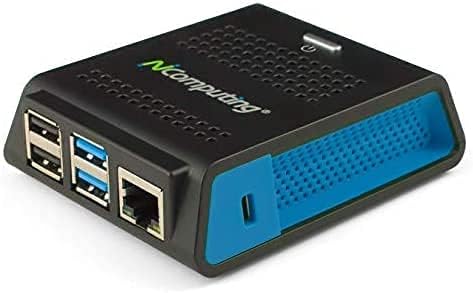
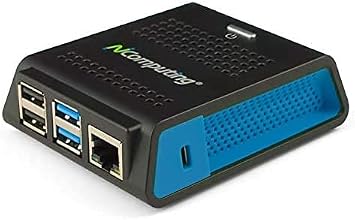
- Verified Microsoft Azure Virtual Desktop (AVD) solution based on the Raspberry Pi 4 with built-in native dual display support, integrated Gigabit Ethernet and 802.11 b/g/n/ac WiFi support.
- 2 USB 3.0 and 2 USB 2.0 highspeed ports with transparent redirection of USB peripheral devices including mass storage, printers, scanners, smart card readers, headsets or speakers, webcams and COM ports in addition to the standard keyboard and mouse.
- Integrated local Chromium browser support provides additional flexibility for direct access of web content and web apps without desktop virtualization. Integrated PMC Device Management Software makes deployment and management quick and easy.
- Box includes the RX420(RDP) device, VESA mount kit and power supply (no cables included).
| RAM Memory Installed | 2 GB |
| Memory Storage Capacity | 2 GB |
| CPU Model | Others |
| Processor Speed | 1.5 GHz |
| Connectivity Technology | Bluetooth, Ethernet, USB, Wi-Fi |
| Operating System | Raspberry Pi OS or compatible operating system |
| Processor Brand | other |
| Wireless Compability | 802.11a/b/g/n/ac |
| Compatible Devices | Keyboards, mice, USB storage devices, printers, scanners, smart card readers, headsets, speakers, webcams, COM ports, and other USB devices compatible with the SBC's USB ports. |
| RAM Memory Technology | LPDDR4 |
| Processor Count | 1 |
| Total Usb Ports | 4 |
| Brand | NComputing |
| Model Name | RX420-RDP |
| Built-In Media | RX420 (RDP) Thin Client, 1 x Power Supply, 1 x 16 GB SD Card, 1 x VESA Mount Kit, 1 x Quick Installation Guide |
| UPC | 882508000634 |
| Model Number | RX420-RDP |
| Mfr Part Number | 500-0184 |
| Manufacturer | NComputing Co. LTD. |
| Item Dimensions L x W x H | 4"L x 3"W x 1"H (10.2 x 7.6 x 2.5 cm) |
| Ram Memory Installed Size | 2 GB |
What's in the box
RX420 (RDP) Thin Client, 1 x Power Supply, 1 x 16 GB SD Card, 1 x VESA Mount Kit, 1 x Quick Installation Guide
Who Should Buy?

-
Remote Workforces
Ideal for businesses with remote employees needing consistent access to applications and data via secure connections.
-
Educational Institutions
Great for schools implementing virtual desktops, allowing multiple students to access educational resources efficiently.
-
Cost-Conscious Businesses
Perfect for organizations looking to reduce hardware costs while maintaining performance through centralized management.

-
High-Performance Requirements
Not suitable for users needing intensive graphics or processing power, like gaming or video editing professionals.
-
Standalone Use
Not ideal for situations that require independent operations, as it relies on connection to a server or cloud.
-
Limited IT Support
Users with no IT support may struggle with troubleshooting and setup due to the thin client architecture.
產品描述
About This Item
Introducing the NComputing RX420 (RDP) - The Ultimate Virtual Desktop Solution Are you searching for a high-performance, cost-effective virtual desktop solution? Look no further than the NComputing RX420 (RDP). Designed on the Raspberry Pi 4 platform, this cloud-enabled thin client guarantees exceptional performance and value for users. With native support for Microsoft Windows Virtual Desktop (WVD), Remote Desktop Service (RDS), VERDE VDI, VERDE Remote PC Access, and vSpace Pro Enterprise, the RX420 (RDP) is the perfect choice for organizations in need of a centrally managed virtual desktop experience. The RX420 (RDP) delivers a powerful PC-like experience while conserving energy. Equipped with native dual display support, enjoy the convenience of working across multiple screens seamlessly.
Additionally, the integrated local Chromium browser support offers enhanced flexibility, enabling users to access web content and apps without relying on desktop virtualization. Deployment is a breeze with the RX420 (RDP). Designed to be easy to set up, this thin client is an ideal choice for organizations utilizing Microsoft WVD, Microsoft RDS, VERDE VDI, VERDE Remote PC Access, or vSpace Pro deployments. Unparalleled peripheral support is a standout feature of the RX420 (RDP). With transparent USB support, enjoy full-screen, full-motion HD multimedia playback, Microsoft RemoteFX, and NComputing vCAST streaming.
Stay connected with WiFi capabilities and take advantage of the native dual display connection. Please note that the Microsoft WVD and integrated Chromium browser support are available in the RX420 (RDP) firmware version 1.10.10 and above. To access the latest firmware updates, visit our website at [insert website link]. Choose the NComputing RX420 (RDP) for excellent performance, affordability, and ease of use. Revolutionize your virtual desktop experience today and take advantage of the power of cloud computing. Whether you're looking for hardware, software, or virtual desktop solutions, NComputing RX420, Microsoft WVD, and vSpace Pro Enterprise have got you covered.
Experience the future of virtualization with NComputing RX420 - order yours now.
有疑問? 和我們聊天
客戶問答
-
問題:
What operating systems is the NComputing RX420RDP compatible with?
Answer: The NComputing RX420RDP Thin Client is designed to be compatible with various operating systems, notably Microsoft AVDRDS, Verde VDI, and vSpace Pro Enterprise. This compatibility allows users to seamlessly connect to virtual desktops and applications, making it an ideal choice for organizations utilizing virtual environments. Additionally, this flexibility ensures that businesses can integrate the RX420RDP into their existing IT infrastructures with minimal disruption, catering to a range of technical needs and preferences. -
問題:
What are the key features of the NComputing RX420RDP Thin Client?
Answer: The key features of the NComputing RX420RDP include an efficient design that supports high-performance applications, low power consumption, and support for multiple monitors. This thin client allows users to access their virtual desktops with optimal performance while maintaining a lightweight footprint, making it suitable for office environments where space is at a premium. Its capability to connect multiple displays enhances productivity for users who rely on extensive multitasking, making it perfect for professionals needing robust working setups. -
問題:
How does the NComputing RX420RDP enhance user experience?
Answer: The NComputing RX420RDP enhances user experience through its fast boot times, seamless connectivity, and support for rich multimedia applications. With the capability to run intensive applications while maintaining smooth performance, users can enjoy a high-quality computing experience similar to that of traditional PCs. This thin client is especially beneficial for environments where multiple users require simultaneous access to demanding resources, such as in educational institutions or IT service providers. -
問題:
Can the NComputing RX420RDP support remote work?
Answer: Yes, the NComputing RX420RDP is well-suited for remote work scenarios, allowing employees to access their organization's virtual workspace from various locations. This support for remote desktop protocols ensures that users can securely connect to their workstations regardless of their physical location, promoting flexibility in work arrangements. Businesses can leverage this capability to enhance productivity and maintain operational continuity, especially crucial in today's hybrid work environments. -
問題:
What is the installation process for the RX420RDP?
Answer: The installation process for the NComputing RX420RDP involves connecting the thin client to a power source, network, and monitors. Once powered on, it initializes and connects to the predefined virtual desktop environment. Detailed configuration can typically be done through an intuitive web-based interface, making it straightforward for IT staff. This swift setup process minimizes downtime for employees, allowing businesses to deploy multiple units quickly and efficiently in a rollout situation. -
問題:
What is the intended user base for the RX420RDP?
Answer: The NComputing RX420RDP is primarily intended for organizations that utilize virtual desktop infrastructure (VDI) for their operations, such as educational institutions, hospitals, and large enterprises. Its design caters to environments where multiple users require access to high-performance computing resources without the overhead of individual PCs. This makes it an attractive solution for sectors looking to optimize resources while providing employees with reliable access to necessary applications and data. -
問題:
What is the support for peripheral devices on the RX420RDP?
Answer: The NComputing RX420RDP supports a range of peripheral devices, including USB devices, printers, and additional monitors. This support enhances user flexibility by allowing them to connect their preferred devices without significant limitations, fostering ease of use across various tasks. For instance, in an office setting, employees can use printers and external storage devices alongside their virtual desktop setup, contributing to a comprehensive and cohesive work experience. -
問題:
How energy-efficient is the NComputing RX420RDP?
Answer: The NComputing RX420RDP is designed with energy efficiency in mind, consuming significantly less power than traditional desktop PCs. This lower energy footprint not only contributes to cost savings for organizations over time but also aligns with environmentally friendly business practices. Users can expect that deploying multiple RX420RDP units will have a minimal impact on total energy consumption, making it an excellent choice for companies aiming to reduce their carbon footprint. -
問題:
What kind of support can users expect with the RX420RDP?
Answer: Users can expect robust support for the NComputing RX420RDP, including comprehensive documentation, online community forums, and dedicated customer service teams. These resources ensure that users can troubleshoot issues, seek settings optimization advice, and get the most out of their thin clients. Engaging with support resources proves invaluable for organizations, especially when transitioning to or maintaining VDI solutions, reinforcing operational efficiency and user satisfaction. -
問題:
Where can I buy NComputing RX420RDP Thin Client in Taiwan?
Answer: You can buy the NComputing RX420RDP Thin Client for Microsoft AVDRDS, Verde VDI, and vSpace Pro Enterprise through Ubuy in Taiwan. Ubuy offers a convenient platform for purchasing tech products, providing competitive options that facilitate easy access to this thin client, ensuring you can obtain it alongside any other necessary supplies for your virtual setup.
NComputing Single Board Computers RX420-RDP Editorial Review
The NComputing RX420(RDP) is a thin client device based on Raspberry Pi hardware with added heat sinks and an active modulated fan. It runs on NComputing firmware with compatibility for listed virtualization platforms and centralized remote management. The device has two native mini-HDMI ports and can run dual monitors, albeit maxing out at 30Hz refresh. It doesn't support add-ons like SDA for a third monitor. The RX420(RDP) features built-in Ethernet and dual-band WiFi with personal and enterprise security authentication support. It supports OpenVPN, OpenConnect VPN, PPTP, IPSec, and FortiClient SSL VPN. Firmware updates are available on the NComputing website, and a license is required after the first year of software/firmware updates for continued update support. The RX420(RDP) supports both RemoteApps and RemoteDesktops from Microsoft terminal server. The device is easy to set up and has full compatibility with Microsoft. It works well for basic RDP administration tasks, but it may not live up to its multimedia playback marketing material. It has some low-res video issues that can be fixed with firmware updates. The power light remains on when the device is not in use, and there is no Bluetooth support.
Customer Reviews & Ratings
27 客戶評價
-
5 星
46%
-
4 星
28%
-
3 星
21%
-
2 星
0%
-
1 星
5%
評論這個產品
和其他客戶分享您的想法
優點
- Easy to set up
- Dual monitors compatible with two native mini-HDMI ports
- Built-in Ethernet and dual-band WiFi with authentication support
- Compatible with multiple VPN protocols
- Supports RemoteApps and RemoteDesktops from Microsoft terminal server
缺點
- Some low-res video issues initially
Platform Trust & Buyer Confidence

MT
Mohd
Verified buyer
“The product received very good packaging & safe…Thank You”
16 June 2026 · via Trustpilot
SJ
Shawati
Verified buyer
“Accurate delivery timing given”
16 June 2026 · via Trustpilot
YB
Youcef
Verified buyer
“Not madly expensive like I thought, and much quicker than promised.”
15 June 2026 · via Trustpilot
LM
Leila
Verified buyer
“Never dealt with Ubuy before, but everything worked out great. Seamless cross border purchasing and shipping. Thanks!”
6/7/2026 · via Trustpilot
KA
Kwame
Verified buyer
“The process was smooth, with clear communication and timelines. This was my 1st purchase and I am really impressed. I will definitely be coming back.”
12 June 2026 · via Trustpilot
安全結帳
Global Delivery
Easy Returns
Genuine Products
Related Categories
Related Brands
Product Price History
重要資訊
- 限制:對於國際運輸的產品,請注意任何製造商保修可能無效;製造商服務選項可能不可用;產品手冊、說明和安全警告可能不是目的地國家的語言;產品(及隨附材料)的設計可能不符合目的地國家的標準、規範和標籤要求;並且產品可能不符合目的地國家的電壓和其他電氣標準(如果適用,需要使用適配器或轉換器)。收件人有責任確保產品可以合法進口到目的地國家。當從Ubuy或其關聯公司訂購時,收件人是記錄在案的進口人,並且必須遵守目的地國家的所有法律和法規。
- 由於Ubuy是一個全球搜索引擎,因此並非Ubuy上列出的所有產品都在出售。產品受出口/貿易法規的約束。
TWD 10637
立即訂購並活動它 週二, 七月 14
This item is not restrict in my country.(Please click on above link if this item is not restrict in your country, So our team will review and allow.)
QTY:
Secured transaction
PCI DSS compliant and ISO 27001:2022 certified, with encrypted payments and full buyer protection on every order.
Our Top Logistics Partners
Fastest cross-border delivery
特色和優勢
- Native dual display support
- Transparent redirection of USB devices
- Local Chromium browser support
- PMC Device Management Software for quick deployment and management
- Includes VESA mount kit and 1 year of firmware maintenance updates
- Requires connection license for specific virtualization platform (not included)
Ubuy Assurance
Experience worry-free shopping with 100% original products, PCI DSS-compliant payment security, ISO 27001-certified data protection, the fastest cross-border delivery, free returns *, and secure packaging on every order.