- 主頁 /
- 電子產品 /
- Television & Video /
- DVD Players & Recorders /
- DVD Recorders /
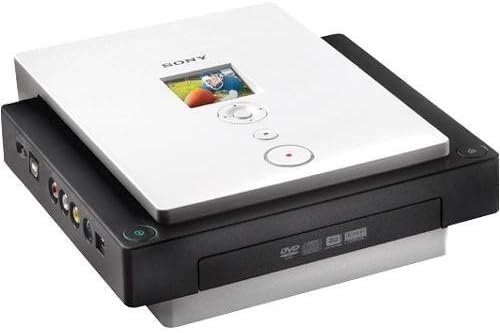
- Sony VRD-MC1 DVDirect External USB 2.0 Multi-...



商品#:
2090433
Sony VRD-MC1 DVDirect External USB 2.0 Multi-Function 16x DVD Recorder
76% of respondents would recommend this to a friend
商品#:
2090433
TWD 9614
Price Details
Excluding Shipping & Custom charges ( Shipping and custom charges will be calculated on checkout )
*All items will import from 美國
0 ratings
撰寫評論
有存貨
 從USA商店匯入
QTY:
庫存僅剩 1 件商品。
立即訂購並活動它 週五, 九月 18
Secured transaction
Ubuy works hard to protect your security and privacy. Our advanced payment security system ensures confidentiality by encrypting your information during transmission using AES (Advanced Encryption Standards) and SSL (Secure Socket Layer) protocols. Your payment details are 100% secure as we do not share your payment details with third party sellers.
Our Top Logistics Partners


Record all video and digital photos to DVD without the need for a computer

Fast
Shipping

Free
Return*

Secure Packaging

100% Original Products

PCI DSS Compliance

ISO 27001 Certified



What Stands Out
High-Speed Recording
With 16x DVD recording capability, the Sony VRD-MC1 allows users to quickly create high-quality DVDs from various video sources without the need for a computer.
Versatile Connectivity
Featuring multiple input options, this DVD recorder easily connects to camcorders and other devices, ensuring seamless video transfer and hassle-free recording.
User-Friendly Interface
Designed with simplicity in mind, the VRD-MC1 includes an intuitive interface that simplifies the process of creating DVDs, making it accessible for users of all skill levels.
產品詳情
- Records video and digital stills from camcorders, digital cameras, and audio-visual sources to DVD without a computer
- Includes memory stick duo slot and a multi-card slot for memory stick, SD memory card, xD picture card, and compact flash for digital stills
- 4-pin i.LINK (IEEE1394) port for camcorder connection, and composite video, S-video, and L/R audio connections for audio-video recording
- Prints images directly to PictBridge compatible printers
- Includes Nero software suite for managing and editing digital imagery
- No need to download photos and videos to a computer, directly record to DVD
| Media Type | DVD |
| Other Special Features of the Product | Portable |
| Resolution | 720 x 576 pixels |
| Connector Type | USB 2.0 |
| Connectivity Technology | USB |
| Audio Output Mode | Stereo |
| Supported Audio Format | MP3, WAV, Dolby Digital, DTS, PCM |
| Surround Sound Channel Configuration | 5.1 |
| Video Encoding | MPEG-2 |
| Write Speed | 22.16 MB/s |
| Compatible Devices | Television |
| Analog Video Format | NTSC |
| Number of Channels | 16 |
| Video Output Resolution | 480p |
| File Format | AVI, MP4, GIF, BMP, MP3, JPEG, WAV, WMA, AAC |
| Item Weight | 3.9 pounds (1.77 kg) |
| Brand | Sony |
| Model Name | VRD-MC1 |
| Built-In Media | Nero software suite, 4-pin i.LINK (IEEE1394) port for a camcorder connection |
| Unit Count | 1 Count |
| UPC | 027242686854 |
| Number of Items | 1 |
| Global Trade Identification Number | 00027242686854 |
| Manufacturer | Sony IT |
| Model Number | VRD-MC1 |
| Mfr Part Number | VRD-MC1 |
| Color | Black |
| Special Feature | Portable |
What's in the box
Nero software suite, 4-pin i.LINK (IEEE1394) port for a camcorder connection
Who Should Buy?

-
Home Movie Enthusiasts
Ideal for individuals looking to convert home videos to DVDs easily without complex software or hardware setups.
-
Small Businesses
Great for small businesses needing a simple way to create promotional DVDs or tutorials for their clients.
-
Hobbyists and Crafters
Perfect for craft enthusiasts wanting to preserve their creations in a tangible format through DVD recordings.

-
Professional Videographers
Not suitable for professionals who require advanced features and higher quality output for client projects.
產品描述
有疑問? 和我們聊天
客戶問題與解答
-
問題:
What is the main function of the Sony VRD-MC1 DVDirect recorder?
Answer: The Sony VRD-MC1 DVDirect External USB 2.0 Multi-Function 16x DVD Recorder is designed primarily for converting video content from various sources into DVD format. It supports a range of inputs like camcorders and VHS players, enabling users to create high-quality DVDs directly from their video recordings without the need for a computer. This is particularly useful for preserving precious memories and sharing them with family and friends in a tangible format. -
問題:
Can I use the Sony VRD-MC1 with a USB flash drive?
Answer: No, the Sony VRD-MC1 DVDirect model does not support direct use with USB flash drives; it primarily accepts video input from camcorders or external devices via USB 2.0. If you're looking to record content, you will need to connect a video source. Its design focuses on converting analog and digital video signals directly to DVDs, making it a reliable choice for video archiving. -
問題:
What types of media can I use with the Sony VRD-MC1 DVD Recorder?
Answer: You can use various types of blank media including DVD-R, DVD-RW, DVD+R, and DVD+RW formats with the Sony VRD-MC1. This versatility allows you to choose the most suitable disc format based on how you plan to use or share your recorded footage. Whether you're finalizing a project or creating a master copy, this recorder adapts to your media preferences. -
問題:
Does the Sony VRD-MC1 support HD video recording?
Answer: The Sony VRD-MC1 primarily records video in standard definition; however, it can also handle a variety of video formats fed from high-definition sources if the conversion processes are standardized to fit disk capacity. While it provides quality outputs, for true high-definition recordings, you might consider a more advanced model. It's a great choice for converting standard footage efficiently. -
問題:
How do I connect the Sony VRD-MC1 to my camcorder?
Answer: Connecting your camcorder to the Sony VRD-MC1 is straightforward. Use a USB cable to link the camcorder to the recorder, or you may need to utilize RCA cables depending on your camcorder's output options. Once connected, the recorder can capture the video content directly. This setup is perfect for fast transfers and convenient archiving of your videos. -
問題:
What video formats can be recorded using the Sony VRD-MC1?
Answer: The Sony VRD-MC1 allows recording from various supported formats including MPEG-2, which is the standard for DVD video. This means that a wide range of formats from different devices can be converted without compatibility issues. By capturing content in an industry-standard format, you can ensure playback on most DVD players, preserving your videos for future viewing. -
問題:
Is there an option for dubbing tapes to DVD using the Sony VRD-MC1?
Answer: Yes, the Sony VRD-MC1 is capable of dubbing content from analog sources like VHS tapes to DVD. This makes it an excellent solution for digitizing your older media and preserving those cherished memories. By simply connecting a VCR and following the user-friendly interface, you can easily transfer your tapes to a more durable and accessible format. -
問題:
Can I edit my videos before burning them to DVD with the Sony VRD-MC1?
Answer: The Sony VRD-MC1 does not offer advanced video editing capabilities. It primarily functions as a recording and conversion device. However, you can arrange your clips in the order you desire before burning, ensuring a cohesive viewing experience. For editing, consider using dedicated video editing software before transferring the edited content to this recorder. -
問題:
How long does it take to burn a DVD with the Sony VRD-MC1?
Answer: The burning process for a DVD using the Sony VRD-MC1 typically takes about 30 minutes to an hour, depending on the length and quality of the video being recorded. This timeframe provides a balance between quality and efficiency, making it suitable for both quick projects and more extensive recordings. It's perfect for streamlining your video duplication process. -
問題:
Where can I buy the Sony VRD-MC1 DVDirect External USB 2.0 Multi-Function 16x DVD Recorder?
Answer: You can purchase the Sony VRD-MC1 DVDirect External USB 2.0 Multi-Function 16x DVD Recorder from Ubuy, which is a reliable online store offering a wide range of electronics and accessories in Taiwan. Their platform is user-friendly, ensuring that you can easily find the product and place your order with confidence.
Sony DVD Recorders VRD-MC1 Editorial Review
未找到編輯評論
Customer Reviews & Ratings
56 客戶評價
-
5 星
47%
-
4 星
8%
-
3 星
16%
-
2 星
6%
-
1 星
23%
評論這個產品
和其他客戶分享您的想法
Platform Trust & Buyer Confidence

JG
Jazz
Verified buyer
“Easy to use and always helpful and sorts any issues I've had past and present”
1 September 2026 · via Trustpilot
EK
Emmanuel
Verified buyer
“I always receive support when I engage customer service. Overall my experience with UBUY has been top notch. Keep up the good work.”
31 August 2026 · via Trustpilot
F
fnd
Verified buyer
“The delivery was fast and the product came undamaged and authentic.”
29 August 2026 · via Trustpilot
LC
Leana
Verified buyer
“Ubuy is extremely efficient and to order online is an easy process. The verity of products to buy is really unlimited! My order was urgent and I got it on time. The products are great! Thank you Ubuy!”
25 August 2026 · via Trustpilot
HL
Hengo
Verified buyer
“Fast, convenient and cheap. Great store!”
27 August 2026 · via Trustpilot
安全結帳
Global Delivery
Easy Returns
Genuine Products
Product Price History
重要資訊
- 限制:對於國際運輸的產品,請注意任何製造商保修可能無效;製造商服務選項可能不可用;產品手冊、說明和安全警告可能不是目的地國家的語言;產品(及隨附材料)的設計可能不符合目的地國家的標準、規範和標籤要求;並且產品可能不符合目的地國家的電壓和其他電氣標準(如果適用,需要使用適配器或轉換器)。收件人有責任確保產品可以合法進口到目的地國家。當從Ubuy或其關聯公司訂購時,收件人是記錄在案的進口人,並且必須遵守目的地國家的所有法律和法規。
- 由於Ubuy是一個全球搜索引擎,因此並非Ubuy上列出的所有產品都在出售。產品受出口/貿易法規的約束。
TWD 9614
立即訂購並活動它 週五, 九月 18
This item is not restrict in my country.(Please click on above link if this item is not restrict in your country, So our team will review and allow.)
QTY:
庫存僅剩 1 件商品。
Secured transaction
PCI DSS compliant and ISO 27001:2022 certified, with encrypted payments and full buyer protection on every order.
Our Top Logistics Partners
Fastest cross-border delivery
特色和優勢
- Direct DVD recording from camcorder/VCR or digital camera memory cards
- Connects to computer via USB 2.0 for advanced DVD projects
- Includes automatic menu and title/chapter creation
- Supports multiple memory card types and i.LINK port for camcorder connection
- Ability to print images directly to PictBridge compatible printers
- Comes with Nero software suite for managing and editing digital imagery
Ubuy Assurance
Experience worry-free shopping with 100% original products, PCI DSS-compliant payment security, ISO 27001-certified data protection, the fastest cross-border delivery, free returns *, and secure packaging on every order.