0 ratings


商品#:
12467700
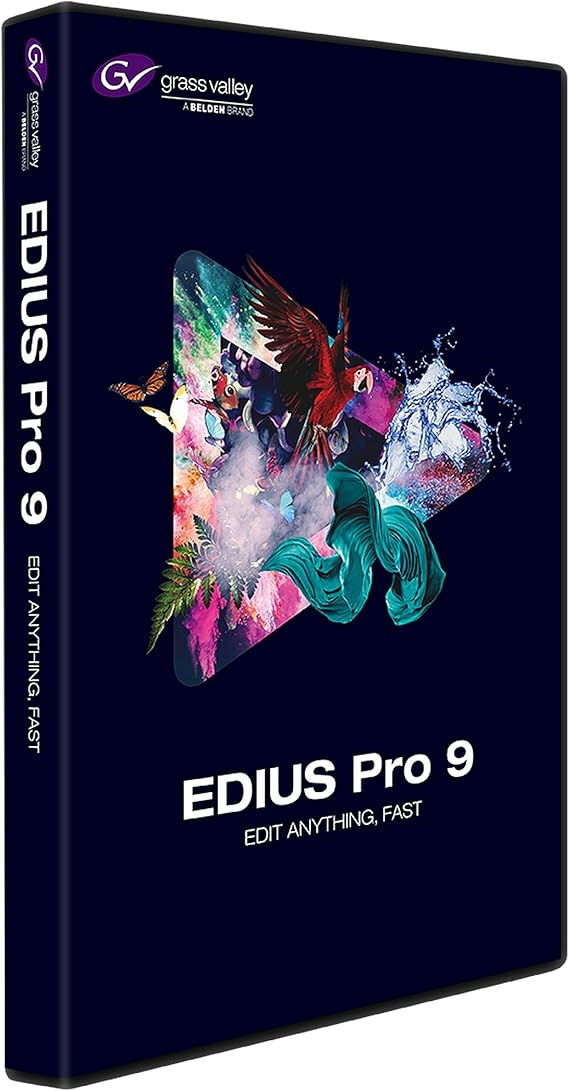
Grass Valley EDIUS Pro 9 Video Editing Software, Academic, Box
商品#:
12467700
TWD 16457
Price Details
Excluding Shipping & Custom charges ( Shipping and custom charges will be calculated on checkout )
*All items will import from 美國
0 ratings
撰寫評論
有存貨
 從USA商店匯入
立即訂購並活動它 週四, 十月 08
Secured transaction
Ubuy works hard to protect your security and privacy. Our advanced payment security system ensures confidentiality by encrypting your information during transmission using AES (Advanced Encryption Standards) and SSL (Secure Socket Layer) protocols. Your payment details are 100% secure as we do not share your payment details with third party sellers.
Our Top Logistics Partners


EDIUS Pro 9 is the most versatile and fastest nonlinear editing software available, allowing you to edit faster and be more creative.

Fast
Shipping

Free
Return*

Secure Packaging

100% Original Products

PCI DSS Compliance

ISO 27001 Certified


What Stands Out
Academic Pricing
Tailored for students and educators, EDIUS Pro 9 offers a cost-effective solution for learning and mastering video editing, making high-quality software accessible for academic purposes.
Real-Time Editing
Experience seamless real-time editing with advanced rendering capabilities, allowing users to work with high-resolution footage without interruptions, enhancing the overall workflow and efficiency.
Multi-Format Support
Supports a wide range of video formats, enabling versatile project management without the need for additional conversions, thus simplifying the editing process for creators.
產品詳情
- Grass Valley EDIUS Pro 9 video editing software
- Designed for academic use
- Comes in a box packaging
- Offers advanced video editing features
- Compatible with various file formats
- Includes support for multiple cameras and formats
| Item Weight | 2 pounds (910 grams) |
| Date First Available | August 6, 2024 |
| Manufacturer | Grass Valley |
Who Should Buy?

-
Student Filmmakers
Ideal for film students needing professional software for editing projects, enhancing their learning experience and practical skills.
-
Professional Editors
Perfect for editors seeking robust tools for fast-paced editing environments with advanced capabilities and format support.
-
Educators
Great for teachers incorporating video editing into their curriculum, providing students with industry-standard software for learning.

-
Casual Users
Not suitable for casual users who require simple editing features, as it may be overly complex for basic needs.
產品描述
Grass Valley EDIUS Pro 9 Video Editing Software, Academic, Box
About This Item
Introducing Grass Valley EDIUS Pro 9 Video Editing Software, Academic, Box - the ultimate tool for all your video editing needs. Whether you're a professional editor, a student, or just starting your video editing journey, this software has got you covered. Experience the power of real-time, no-render editing of all popular SD, HD, and even 4K and HDR formats. With EDIUS Pro 9, you can unleash your creativity without any limitations.
Edit multiple formats and frame rates seamlessly on the same timeline, giving you the freedom to edit faster and make more time for your creative ideas. Grass Valley, a trusted name in the industry, brings you this versatile and fast nonlinear editing software. With EDIUS Pro 9, you'll have access to a wide range of creative options to enhance your videos and make them truly stand out. The software is designed to cater to the needs of professionals, beginners, and academic institutions alike. Whether you're editing videos for personal projects, professional campaigns, or academic assignments, Grass Valley EDIUS Pro 9 is the tool you need.
Its user-friendly interface, powerful features, and extensive format support make it the go-to software for all your video editing requirements. Don't settle for anything less when it comes to video editing software. Choose the best - Grass Valley EDIUS Pro 9 Video Editing Software, Academic, Box. Unlock your creative potential and create amazing videos that leave a lasting impression.
Get your hands on this industry-leading software now and step up your video editing game.
有疑問? 和我們聊天
客戶問答
-
問題:
What are the system requirements for Grass Valley EDIUS Pro 9?
Answer: Grass Valley EDIUS Pro 9 requires a 64-bit Windows operating system, with at least 4GB of RAM, 2GB of graphics memory, and a dual-core processor. It's advisable to have a powerful system for optimal performance, especially for HD and 4K editing. Users should also consider additional disk space for storage, as video files can be substantial. This software is perfect for users working on intensive video projects, such as documentaries or short films, where high-quality output is essential. -
問題:
Can I use Grass Valley EDIUS Pro 9 on a Mac?
Answer: No, Grass Valley EDIUS Pro 9 is designed exclusively for Windows operating systems. Users interested in video editing on Mac should explore alternative software options that support macOS. For professionals who work across different platforms, considering a Windows dual-boot setup or virtualization could allow the use of EDIUS Pro 9 without compromising workflow. This approach is beneficial for users who need to collaborate with others who use EDIUS on PCs. -
問題:
What types of video formats can I edit with EDIUS Pro 9?
Answer: EDIUS Pro 9 supports a wide range of video formats, including popular ones like AVCHD, MP4, MOV, and even high-efficiency formats such as HEVC (H.265). This versatility allows users to work with footage from various cameras and devices seamlessly. Whether you're importing traditional video clips or modern formats from drones and smartphones, EDIUS Pro 9 can handle it all, making it ideal for content creators who shoot across multiple platforms. -
問題:
Is Grass Valley EDIUS Pro 9 suitable for beginners?
Answer: While EDIUS Pro 9 is a professional-grade software, beginners can still use it effectively, given its intuitive interface and extensive tutorials available online. The software offers a variety of templates and presets that can help novices get started. For educational purposes, students and aspiring filmmakers can greatly benefit from its feature-rich environment as they learn the fundamentals of video editing without being overwhelmed by complexity. -
問題:
Does EDIUS Pro 9 support multi-camera editing?
Answer: Yes, EDIUS Pro 9 excels in multi-camera editing, allowing users to synchronize and edit footage from multiple angles seamlessly. This feature is particularly useful for events like weddings, concerts, and sports where capturing all angles is crucial. Users can switch between different camera feeds effortlessly during the editing process, resulting in a polished and professional final product. This functionality enhances storytelling by providing varied perspectives. -
問題:
Does EDIUS Pro 9 offer color correction tools?
Answer: Absolutely, Grass Valley EDIUS Pro 9 includes a comprehensive set of color correction tools, enabling users to enhance their footage with precise control over brightness, contrast, saturation, and more. These tools are pivotal for achieving visually stunning results and ensuring that the final edit maintains a consistent look throughout the project. From correcting disappointingly dull clips to creating vibrant visuals for promotional videos, these features serve a broad range of creative needs. -
問題:
Can I integrate EDIUS Pro 9 with other software?
Answer: Yes, EDIUS Pro 9 supports integration with various third-party software, enhancing its functionality. For instance, users can export projects to Adobe After Effects for additional effects and compositing or use audio editing software for detailed sound design. This kind of interoperability is invaluable for professional editors looking to streamline their workflow and achieve more sophisticated edits. Such integrations often enhance the production value of video projects. -
問題:
What is the difference between EDIUS Pro 9 and EDIUS X?
Answer: While both EDIUS Pro 9 and EDIUS X are professional video editing software, EDIUS X represents a significant upgrade with new features such as enhanced support for 8K editing and advanced audio tools. EDIUS Pro 9 remains a solid choice for users who require a robust editing solution without needing the latest advancements in technology. The differences mainly cater to the evolving needs of video professionals, with EDIUS X targeting those seeking the latest functionalities. -
問題:
Is there a trial version available for EDIUS Pro 9?
Answer: Grass Valley offers a trial version of EDIUS Pro 9, providing users the chance to explore its features before committing to a purchase. The trial typically includes most of the same functionalities as the full version, allowing potential buyers to test out the editing capabilities and usability. This is particularly beneficial for educational institutions or users unfamiliar with the software, as it enables informed decision-making in pursuing comprehensive video editing tools. -
問題:
Where can I buy Grass Valley EDIUS Pro 9 Video Editing Software, Academic, Box?
Answer: You can purchase Grass Valley EDIUS Pro 9 Video Editing Software, Academic, Box at Ubuy within Taiwan. Ubuy is a reliable online retailer that provides a convenient shopping experience for various software products, including professional video editing solutions. Their platform ensures you find the right version of EDIUS Pro that meets academic requirements effectively.
Grass Valley Editorial Review
未找到編輯評論
Customer Reviews & Ratings
1 客戶評價
-
5 星
100%
-
4 星
0%
-
3 星
0%
-
2 星
0%
-
1 星
0%
評論這個產品
和其他客戶分享您的想法
優點
- User-friendly interface
- Fast rendering speed
- Excellent formats support
- Real-time editing
- Multi-camera support
缺點
- Occasional crashes
Platform Trust & Buyer Confidence

MA
Mohammad
Verified buyer
“Excellent quality and original too,when ubuy send original things I will appreciate that ,I very satisfied thank you”
23 July 2026 · via Trustpilot
CK
Chitra
Verified buyer
“The order and delivery progress was communicated very well. Package arrived within the estimated time. Products arrived as expected in good condition.”
22-Jul-26 · via Trustpilot
K
kund
Verified buyer
“Good supply of products. Safe payment methods, and shipment worldwide! Genuine products.”
23-Jul-26 · via Trustpilot
OO
Onesi
Verified buyer
“Was my first time buying a product from Ubuy, but I found it so helpful. This is reliable. Gonna place a new order!”
22 July 2026 · via Trustpilot
SJ
SAO JOHN
Verified buyer
“Ubuy is a great online platform to buy stuff. Reliable, fast delivery time and great value for money. I've been using Ubuy online shopping platform for three years now and will continue to do so.”
23 July 2026 · via Trustpilot
安全結帳
Global Delivery
Easy Returns
Genuine Products
Product Price History
重要資訊
- 限制:對於國際運輸的產品,請注意任何製造商保修可能無效;製造商服務選項可能不可用;產品手冊、說明和安全警告可能不是目的地國家的語言;產品(及隨附材料)的設計可能不符合目的地國家的標準、規範和標籤要求;並且產品可能不符合目的地國家的電壓和其他電氣標準(如果適用,需要使用適配器或轉換器)。收件人有責任確保產品可以合法進口到目的地國家。當從Ubuy或其關聯公司訂購時,收件人是記錄在案的進口人,並且必須遵守目的地國家的所有法律和法規。
- 由於Ubuy是一個全球搜索引擎,因此並非Ubuy上列出的所有產品都在出售。產品受出口/貿易法規的約束。
TWD 16457
立即訂購並活動它 週四, 十月 08
This item is not restrict in my country.(Please click on above link if this item is not restrict in your country, So our team will review and allow.)
QTY:
Secured transaction
PCI DSS compliant and ISO 27001:2022 certified, with encrypted payments and full buyer protection on every order.
Our Top Logistics Partners
Fastest cross-border delivery
Ubuy Assurance
Experience worry-free shopping with 100% original products, PCI DSS-compliant payment security, ISO 27001-certified data protection, the fastest cross-border delivery, free returns *, and secure packaging on every order.