




商品#:
3753455
xPrintServer Network Edition
75% of respondents would recommend this to a friend
商品#:
3753455
TWD 6580
Price Details
Excluding Shipping & Custom charges ( Shipping and custom charges will be calculated on checkout )
*All items will import from 美國
0 ratings
撰寫評論
有存貨
 從USA商店匯入
QTY:
庫存僅剩 1 件商品。
立即訂購並活動它 週二, 九月 29
Secured transaction
Ubuy works hard to protect your security and privacy. Our advanced payment security system ensures confidentiality by encrypting your information during transmission using AES (Advanced Encryption Standards) and SSL (Secure Socket Layer) protocols. Your payment details are 100% secure as we do not share your payment details with third party sellers.
Our Top Logistics Partners


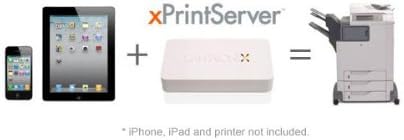
xPrintServer enables wireless printing to nearly any printer without the need for software or drivers.

Fast
Shipping

Free
Return*

Secure Packaging

100% Original Products

PCI DSS Compliance

ISO 27001 Certified



What Stands Out
Easy Network Setup
XPrintServer allows effortless integration with existing network environments, enabling quick configuration for seamless printing from various devices, making it ideal for both home and professional users.
Robust Compatibility
Designed to support a wide range of printers, XPrintServer significantly reduces compatibility issues, allowing users to connect numerous devices efficiently, enhancing productivity across multiple platforms.
Server Performance
With optimized server capabilities, XPrintServer ensures high-speed, reliable printing without the need for additional drivers, maximizing operational efficiency while minimizing setup time and complexity.
產品詳情
| Printer Type | Laser |
| Other Special Features of the Product | Wireless |
| Printer Output Type | Monochrome |
| Item Weight | 270 g |
| Controller Type | iOS |
| Print media | Labels |
| Compatible Devices | Smartphones |
| Additional Printer Functions | Print Only |
| Control Method | App |
| Processor Count | 1 |
| Number of Drivers | 1 |
| Maximum Media Size | A6 |
| Maximum Sheet Capacity | 100 |
| Paper Size | 105 millimeters |
| Output sheet capacity | 100 |
| Printer Connectivity Type | Ethernet |
| Hardware Interface | Ethernet |
| Number of Ethernet Ports | 1 |
| Total USB 2.0 Ports | 1 |
| Total Usb Ports | 1 |
| Brand | Lantronix |
| Model Name | Network Edition |
| Model Number | XPS1001NE-01 |
| Series Number | 1001 |
| Model Series | 1001 |
| Specific Uses For Product | business |
| UPC | 783384234932 |
| Global Trade Identification Number | 00783384234932 |
| Manufacturer | Lantronix |
| Color | White |
| Maximum print Resolution Color | 600 x 600 dpi |
| Duplex | simplex |
| Maximum Copy Resolution Black and White | 600 dpi |
| Connectivity Technology | Ethernet |
| Printing Technology | Laser |
| Special Feature | Wireless |
| Printer Output | Monochrome |
產品描述
有疑問? 和我們聊天
客戶問題與解答
-
問題:
What is the XPrintServer Network Edition?
Answer: The XPrintServer Network Edition is a network printer server designed for easy printing from Apple devices without requiring additional drivers. It connects multiple printers to your network, allowing any Mac, iPhone, or iPad to print seamlessly. This device simplifies print management in busy environments like offices or classrooms where multiple users and devices interact, eliminating the hassle of configuring each device individually. -
問題:
How does the XPrintServer Network Edition work?
Answer: The XPrintServer Network Edition works by automatically detecting printers connected to your network and enabling AirPrint functionality. Simply plug it into your router, and it identifies compatible printers. This functionality streamlines the printing process for users by providing a user-friendly experience, allowing them to print effortlessly from their Apple devices in various settings, whether at work or home. -
問題:
Is the XPrintServer Network Edition compatible with all printers?
Answer: The XPrintServer Network Edition is compatible with a wide range of printers, particularly those that support IPP (Internet Printing Protocol). While it functions best with popular brands like HP and Canon, compatibility may vary. It's advisable to check the official compatibility list to ensure your specific printer model is supported. This flexibility allows businesses and individuals to utilize existing printers without needing to invest in new hardware. -
問題:
Can I use the XPrintServer Network Edition in a mixed environment with both Mac and PC?
Answer: Yes, the XPrintServer Network Edition is designed primarily for Apple devices but can also support printing from Windows machines through additional software. In mixed environments, users can benefit from seamless integration, allowing a diverse group of users to print without transition compatibility issues. This makes it ideal for businesses with mixed operating systems, streamlining the printing processes across various platforms. -
問題:
How many printers can I connect to the XPrintServer Network Edition?
Answer: The XPrintServer Network Edition can connect up to 25 printers simultaneously, making it an excellent choice for small to medium-sized offices. This high capacity enables efficient management and usage, catering to a variety of printing needs. Scenarios such as team projects in offices or classroom environments can greatly benefit from this capability, allowing multiple users to print at once without bottlenecks. -
問題:
What are the setup requirements for the XPrintServer Network Edition?
Answer: Setting up the XPrintServer Network Edition requires just a few steps. Connect it to your router through Ethernet and plug it in. Once powered on, it will auto-configure and begin detecting compatible printers on your network. This straightforward setup makes it a favorite among users who value efficiency, allowing teams to quickly get back to work with minimal technical interruptions. -
問題:
Can I update the XPrintServer Network Edition firmware?
Answer: Yes, the XPrintServer Network Edition allows users to update its firmware for enhanced functionality and security. Regular updates ensure that the device remains compatible with the latest printers and operating systems. Users can easily check for updates through the web interface, ensuring optimal performance. Keeping your device updated is crucial for maintaining its efficiency and compatibility, especially in dynamic office environments. -
問題:
What is AirPrint and how does it relate to the XPrintServer Network Edition?
Answer: AirPrint is Apple's technology that enables wireless printing from iOS and macOS devices. The XPrintServer Network Edition enhances this experience by making non-AirPrint printers compatible with AirPrint. This capability allows users to print from their iPhones or Mac computers to printers that otherwise wouldn't support AirPrint natively. It's particularly beneficial in environments with a variety of printer models, ensuring everyone can print easily. -
問題:
What types of prints can I perform with the XPrintServer Network Edition?
Answer: With the XPrintServer Network Edition, you can perform various printing tasks such as standard document printing, photo printing, and duplex printing, depending on your printer's capabilities. This versatility enables users to handle administrative documents, creative projects, and professional reports from one central device. Its flexibility makes it suitable for diverse work environments like offices, schools, and homes, catering to different printing needs. -
問題:
Where can I buy XPrintServer Network Edition in Taiwan?
Answer: You can purchase the XPrintServer Network Edition from Ubuy in Taiwan. Ubuy offers a variety of technology products, including the XPrintServer, and provides delivery options directly to your location. This ensures you can find the right printing solution conveniently and efficiently.
Lantronix Laptop Accessories XPS1001NE-01 Editorial Review
未找到編輯評論
Customer Reviews & Ratings
125 客戶評價
-
5 星
49%
-
4 星
19%
-
3 星
14%
-
2 星
6%
-
1 星
12%
評論這個產品
和其他客戶分享您的想法
Platform Trust & Buyer Confidence

JK
Jasmin
Verified buyer
“Great products and very good service: very easy and very fast international delivery.”
9 September 2026 · via Trustpilot
AG
Anke
Verified buyer
“Wonderful online shopping experience, smooth transaction from the start. Payment method works conveniently and delivery is unexpectedly fast and reliable. You go the extra mile for service. What makes this even more amazing, you deliver to Namibia. I will remain a happy Ubuy customer and will increase my purchases for sure! Thank you!”
10 September 2026 · via Trustpilot
H
Hazel
Verified buyer
“Very easy to find the products what you need, and so fast delivery, that’s why I highly recommended to others costumers to used ubuy.”
10 September 2026 · via Trustpilot
O
Opaleye
Verified buyer
“I received exactly what I ordered I was skeptical about your site because that was my first time to order. But the order came timely and neatly packaged. I was not disappointed. Thank you.”
11 September 2026 · via Trustpilot
AC
Adele
Verified buyer
“Easy to find and order what you want on the website. Delivery is quick to the UK”
8 September 2026 · via Trustpilot
安全結帳
Global Delivery
Easy Returns
Genuine Products
Product Price History
重要資訊
- 限制:對於國際運輸的產品,請注意任何製造商保修可能無效;製造商服務選項可能不可用;產品手冊、說明和安全警告可能不是目的地國家的語言;產品(及隨附材料)的設計可能不符合目的地國家的標準、規範和標籤要求;並且產品可能不符合目的地國家的電壓和其他電氣標準(如果適用,需要使用適配器或轉換器)。收件人有責任確保產品可以合法進口到目的地國家。當從Ubuy或其關聯公司訂購時,收件人是記錄在案的進口人,並且必須遵守目的地國家的所有法律和法規。
- 由於Ubuy是一個全球搜索引擎,因此並非Ubuy上列出的所有產品都在出售。產品受出口/貿易法規的約束。
TWD 6580
立即訂購並活動它 週二, 九月 29
This item is not restrict in my country.(Please click on above link if this item is not restrict in your country, So our team will review and allow.)
QTY:
庫存僅剩 1 件商品。
Secured transaction
PCI DSS compliant and ISO 27001:2022 certified, with encrypted payments and full buyer protection on every order.
Our Top Logistics Partners
Fastest cross-border delivery
特色和優勢
- No installation of printer drivers required.
- Instant wireless printing from iOS devices.
- Compatible with nearly any network-attached printer.
- No apps to buy or configuration necessary.
- Cost-effective solution—no need for new printers.
- Compact design, as small as an iPhone.
Ubuy Assurance
Experience worry-free shopping with 100% original products, PCI DSS-compliant payment security, ISO 27001-certified data protection, the fastest cross-border delivery, free returns *, and secure packaging on every order.