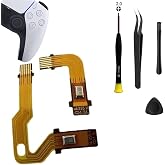
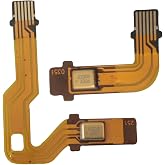
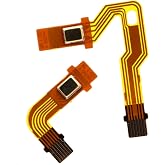
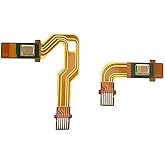
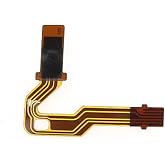
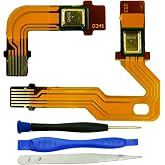
Microphone Flex Cable for PS5 BDM-010 Handle Inner Mic Ribbon Cable Controller Replacement (1 Pair)
TWD 559
Price Details
Excluding Shipping & Custom charges ( Shipping and custom charges will be calculated on checkout )
*All items will import from 美國
QTY:
Ubuy works hard to protect your security and privacy. Our advanced payment security system ensures confidentiality by encrypting your information during transmission using AES (Advanced Encryption Standards) and SSL (Secure Socket Layer) protocols. Your payment details are 100% secure as we do not share your payment details with third party sellers.
Replace your PS5 controller's microphone flex cable with this brand new replacement to ensure your inner mic stays in perfect working condition.
Fast
Shipping
Free
Return*
Secure Packaging
100% Original Products
PCI DSS Compliance
ISO 27001 Certified

What Stands Out
產品詳情
- Replacement Microphone Flex Cable for PS5 Controller
- Please note that these will only fit for PS5 controller
- Brand new
- Package:1 Pair Microphone Flex Cable Replacement
- Model for PS5 BDM-010
| Connector Type | Micro USB |
| Cable Type | Micro USB |
| Compatible Devices | Gaming Console |
| Other Special Features of the Product | Braided |
| Compatible Phone Models | No Compatible Phone Models |
| Connector Gender | Male-to-Female |
| Number of Pins | 5 |
| Maximum Voltage | 5 Volts (DC) |
| Recommended Uses For Product | PS5 controller microphone flex cable replacement |
| Specification Met | UL |
| Indoor Outdoor Usage | Indoor, Outdoor |
| Color | 1 Pair |
| Item Shape | Round |
| Brand Name | NSLikey |
| Model Name | NSLikey Microphone Flex Cable |
| Customer Package Type | coiled in protective tubing |
| Model | 8414892742931 |
| Manufacturer | NSLikey |
| Part Number | BDM-010 |
| Unit Count | 1 Count |
| Item Weight | 0.02 Kilograms |
| Number of Items | 2 |
| Brand | NSLikey |
| Special Feature | Braided |
Who Should Buy?
-
Gamers with Issues
Ideal for gamers experiencing microphone malfunctions in their PS5 controllers, restoring communication capabilities quickly.
-
DIY Repair Enthusiasts
Perfect for individuals skilled in electronics repair, allowing them to replace damaged mic cables efficiently.
-
Cost-Conscious Users
Great for users looking for an affordable solution instead of purchasing a new controller for mic problems.
-
Non-Technical Users
Not suitable for those unfamiliar with electronics repair, as installation requires technical expertise to avoid damage.
-
Gaming Console Newbies
Unsuitable for first-time PS5 users who may not yet understand hardware repair or maintenance complexities.
-
Occasional Gamers
May not be beneficial for infrequent gamers who rarely use the controller’s microphone for communication.
產品描述
客戶問答
-
問題:
What is the Microphone Flex Cable for PS5 BDM-010?
Answer: The Microphone Flex Cable for PS5 BDM-010 is a crucial internal component used to connect the inner microphone of the PlayStation 5 controller. This ribbon cable facilitates clear audio transmission between the microphone and the controller’s main circuit board. If your controller is experiencing audio issues or if the microphone isn't functioning properly, replacing the flex cable can restore its performance, allowing for clear voice communication during gaming sessions. -
問題:
How do I know if I need to replace my PS5 controller's microphone flex cable?
Answer: You may need to replace the microphone flex cable if your PS5 controller's internal microphone is not working, if players cannot hear you during online gaming, or if there are audio distortions. Symptoms may include crackling sounds or complete silence from your microphone. This replacement is crucial for maintaining the quality of in-game communication, particularly in multiplayer scenarios where voice clarity is essential for coordination. -
問題:
Is replacing the microphone flex cable difficult?
Answer: Replacing the microphone flex cable can be somewhat technical, requiring precision and care. It involves disassembling the PS5 controller, accessing its internal components, and carefully removing the old cable before installing the new one. For those comfortable with electronics and DIY repairs, it can be a fulfilling project. However, if you're inexperienced, following detailed video guides or seeking professional assistance may be advisable to avoid damaging other components. -
問題:
Can I use the flex cable from other PS5 models for replacement?
Answer: No, the Microphone Flex Cable for PS5 BDM-010 is specifically designed for the BDM-010 model of the PS5 controller. Using a cable from a different model may not fit correctly and can lead to further issues. To ensure proper function and compatibility, always use the specified cable for your controller model when replacing parts. -
問題:
What tools do I need to replace the microphone flex cable?
Answer: To replace the microphone flex cable, you'll need a set of precision screwdrivers, a plastic prying tool, and possibly tweezers for delicate handling. Additionally, a clean, static-free workspace is essential to prevent any accidental damage to your controller's components. Preparing the right tools makes the replacement more manageable and increases the chances of a successful repair. -
問題:
Will replacing the flex cable void my controller's warranty?
Answer: Yes, replacing internal components like the microphone flex cable on your PS5 controller may void any existing warranty. Manufacturers generally consider unauthorized repairs as actions that can lead to warranty claims being rejected. If your controller is under warranty and facing issues, it’s advisable to contact the manufacturer or an authorized service center instead of attempting a DIY fix. -
問題:
What are the benefits of having a functional microphone flex cable?
Answer: A functional microphone flex cable ensures that your PS5 controller's internal microphone transmits clear audio during gameplay. This is particularly important for online multiplayer games where communication is vital. A properly operating cable eliminates frustrating audio issues, allowing for smooth interactions with teammates, improving your overall gaming experience and ability to strategize effectively. -
問題:
How do I install the new microphone flex cable into my PS5 controller?
Answer: To install the new microphone flex cable, start by carefully opening your PS5 controller and locating the old cable. Remove it and gently install the new flex cable, ensuring it is aligned correctly with the connector on the motherboard. Once in place, reassemble the controller carefully to avoid damaging any components. Following detailed guides can help make this process more straightforward and successful. -
問題:
Where can I buy the Microphone Flex Cable for PS5 BDM-010 in Taiwan?
Answer: You can purchase the Microphone Flex Cable for PS5 BDM-010 from Ubuy, where you'll find a range of options for this specific controller replacement part. Ubuy offers a convenient shopping experience with various shipping options and the ability to explore multiple sellers for your exact needs, ensuring you find the right product to restore your controller's functionality.
NSLikey Microphone Cables Editorial Review
The NSLikey Microphone Flex Cable for PS5 Handle Inner Mic Ribbon Cable is a replacement part for the microphone ribbon cable in a PS5 controller. According to the FAQ section, the replacement cable does not come with rubber pieces, but users can transfer the old ones onto the new microphone. From the reviews, it is evident that opinions on this product are mixed. Some users reported that despite replacing their original Sony PS5 microphone ribbon cable with this one, they experienced issues such as no volume response or the microphone not working at all. On the other hand, there were positive comments from customers who successfully replaced their original ribbons with these and had their controller working like new again. It appears that the compatibility of this replacement part may vary, with some users mentioning that it did not work in their controllers despite fitting properly. As seen from the reviews, there are instances where the microphone still did not function even after the replacement. Overall, the NSLikey Microphone Flex Cable for the PS5 controller has received mixed feedback from users. While some have had success in replacing the original ribbon cable and restoring functionality to their controllers, others have experienced issues with the microphone still not working even after installation. **
Customer Reviews & Ratings
-
5 星
78%
-
4 星
5%
-
3 星
3%
-
2 星
4%
-
1 星
10%
評論這個產品
和其他客戶分享您的想法
優點
- Easy to install
- Fits properly in the controller
缺點
- Microphone may still not work after replacement
Platform Trust & Buyer Confidence
“The product received very good packaging & safe…Thank You”
“Accurate delivery timing given”
“Not madly expensive like I thought, and much quicker than promised.”
“Never dealt with Ubuy before, but everything worked out great. Seamless cross border purchasing and shipping. Thanks!”
“The process was smooth, with clear communication and timelines. This was my 1st purchase and I am really impressed. I will definitely be coming back.”
Product Price History
重要資訊
- 限制:對於國際運輸的產品,請注意任何製造商保修可能無效;製造商服務選項可能不可用;產品手冊、說明和安全警告可能不是目的地國家的語言;產品(及隨附材料)的設計可能不符合目的地國家的標準、規範和標籤要求;並且產品可能不符合目的地國家的電壓和其他電氣標準(如果適用,需要使用適配器或轉換器)。收件人有責任確保產品可以合法進口到目的地國家。當從Ubuy或其關聯公司訂購時,收件人是記錄在案的進口人,並且必須遵守目的地國家的所有法律和法規。
- 由於Ubuy是一個全球搜索引擎,因此並非Ubuy上列出的所有產品都在出售。產品受出口/貿易法規的約束。
TWD 559
立即訂購並活動它 Sunday, 七月 12
This item is not restrict in my country.(Please click on above link if this item is not restrict in your country, So our team will review and allow.)
QTY:
PCI DSS compliant and ISO 27001:2022 certified, with encrypted payments and full buyer protection on every order.
特色和優勢
- Compatible with PS5 controller
- Brand new replacement for microphone flex cable
- Comes in a package of 1 pair
- Ensures the inner mic stays in perfect working condition
- Model BDM-010
Ubuy Assurance
Experience worry-free shopping with 100% original products, PCI DSS-compliant payment security, ISO 27001-certified data protection, the fastest cross-border delivery, free returns *, and secure packaging on every order.