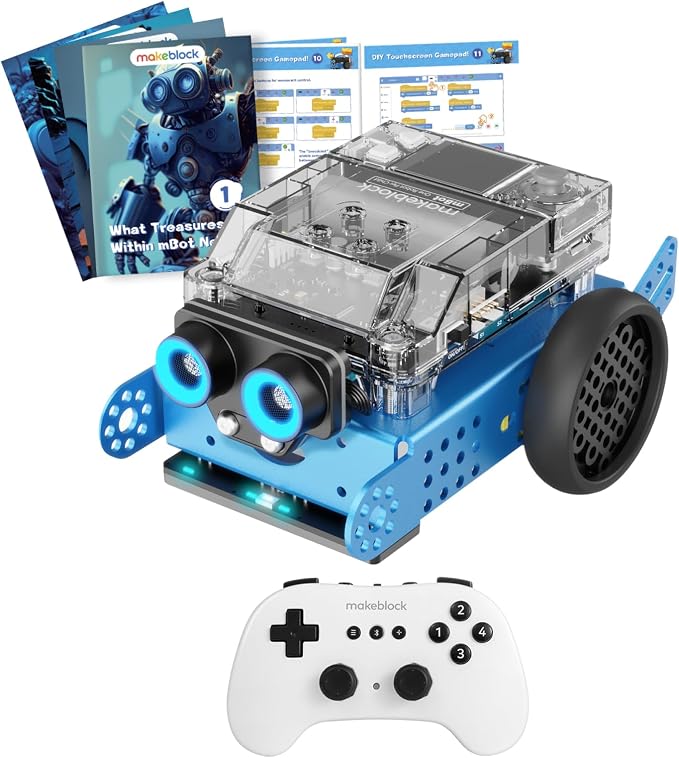
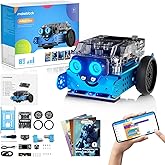
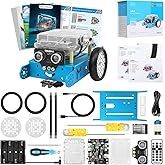
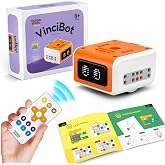
Makeblock mBot2 Educational Coding Robot with Bluetooth Wireless Remote Controller, Scrath and Python Programming in Classroom, AI and Technology
90% of respondents would recommend this to a friend
TWD 9996
Price Details
Excluding Shipping & Custom charges ( Shipping and custom charges will be calculated on checkout )
*All items will import from 美國
Ubuy works hard to protect your security and privacy. Our advanced payment security system ensures confidentiality by encrypting your information during transmission using AES (Advanced Encryption Standards) and SSL (Secure Socket Layer) protocols. Your payment details are 100% secure as we do not share your payment details with third party sellers.
mBot Neo is a powerful tool to get in touch with advanced technology such as AI, IoT and Data Science.
Fast
Shipping
Free
Return*
Secure Packaging
100% Original Products
PCI DSS Compliance
ISO 27001 Certified

What Stands Out
產品詳情
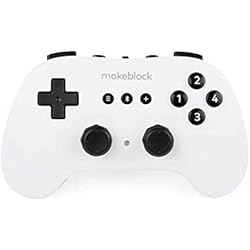
- One-on-one Bluetooth Remote Controller pair for one mBot Neo robot, ideal for classroom teaching.
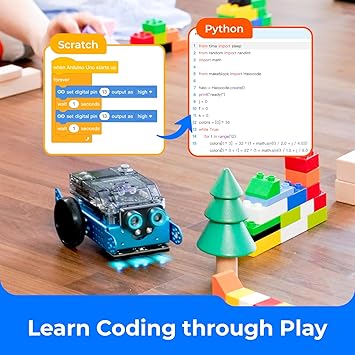
- STEM educational robot kit for kids 8-12 to learn robotics, Scratch & Python Coding, and electronics.
- 4-core MCU with WIFI and Bluetooth modules enables Python programming, high-precision metal gear encoder motors, and various sensors for interactive projects.
- Interactive drag-and-drop software for programming learning, supporting Scratch or Python language with tutorials and project cases.
- Expandable with over 60 different modules, connect up to 10 sensors, motors, or other components, and add-on packs available for further learning.
| Brand Name | Makeblock |
| Age Range Description | Kid |
| Educational Objective | Coding Skills |
| Set Name | mBot2 |
| Number of Packs | 1 |
| Model Number | mBot Neo |
| Manufacturer recommended age | 0 - 12 years |
| Theme | Robot,Robots |
| Battery Description | Rechargeable |
| Material Type | Metal |
| Size | Medium |
| Item Weight | 3.5 lbs (1.59 kg) |
Who Should Buy?
-
Young Learners
Ideal for children ages 8-14, promoting early interest in coding and robotics through hands-on experience.
-
Educators
Perfect for teachers seeking innovative tools to incorporate programming and technology into their curriculum.
-
STEM Programs
Excellent for after-school STEM programs, fostering collaborative learning and problem-solving skills among students.
-
Advanced Coders
Not suitable for experienced programmers looking for complex coding challenges or advanced robotics functionality.
產品描述
Makeblock mBot2 Educational Coding Robot with Bluetooth Wireless Remote Controller, Scrath and Python Programming in Classroom, AI and Technology Learning for Kids
客戶問題與解答
-
問題:
What programming languages can I use with the Makeblock mBot2?
Answer: The Makeblock mBot2 is compatible with Scratch and Python programming languages. Scratch is perfect for beginners as it uses a visual block-based approach, making it easy to learn coding concepts. Python, on the other hand, is ideal for advanced programming and allows for more complex and versatile project creations. This dual-language support enables users of all ages and skill levels to engage in coding activities that enhance problem-solving and logical thinking skills. -
問題:
What features does the Makeblock mBot2 include?
Answer: The mBot2 comes equipped with a variety of features such as Bluetooth connectivity, a wireless remote controller, and various sensors like ultrasonic and line-following sensors. These features allow users to navigate and interact with their environment effectively. The integration of AI and technology engages students in hands-on learning experiences, promoting creativity while allowing them to explore real-world applications of robotics and coding. -
問題:
Is the Makeblock mBot2 suitable for classrooms?
Answer: Absolutely! The Makeblock mBot2 is designed specifically for educational environments. It promotes collaborative learning, encourages teamwork, and enhances classroom engagement through interactive coding activities. With its user-friendly interface and compatibility with Scratch and Python, students from elementary to high school can effectively learn programming concepts while working on exciting projects. -
問題:
Can the mBot2 be controlled using a smartphone or tablet?
Answer: Yes, the Makeblock mBot2 can be controlled via Bluetooth using a smartphone or tablet. Users can download the Makeblock app, which is compatible with both iOS and Android devices. This allows students to engage with the robot wirelessly, promoting flexibility in learning and coding. Using a mobile device also makes it more accessible for students to test their coding skills on the go, enhancing their coding experience. -
問題:
What age group is the Makeblock mBot2 intended for?
Answer: The Makeblock mBot2 is suitable for a wide range of age groups, typically recommended for ages 8 and up. It offers various difficulty levels in programming, making it perfect for beginners and more experienced coders. The structured learning environment allows educators to adapt lessons based on student age and skill level, facilitating a comprehensive learning experience that grows with the students. -
問題:
What types of projects can be created with the mBot2?
Answer: With the Makeblock mBot2, users can create a variety of projects, including obstacle-avoiding robots, line-following robots, and even interactive games. The versatility of the mBot2 encourages creativity as students can explore different configurations and coding techniques. This hands-on approach fosters an understanding of robotics, coding, and engineering principles, making it ideal for project-based learning in the classroom. -
問題:
Is there any online support or community for mBot2 users?
Answer: Yes, Makeblock offers a wealth of online resources including tutorials, documentation, and project ideas on their official website. Additionally, there is a vibrant community of users who share their projects and coding solutions on forums and social media platforms. This support network ensures that both educators and students can find help and inspiration as they work with the mBot2, making the learning process more enjoyable. -
問題:
Does the mBot2 come assembled or does it require building?
Answer: The Makeblock mBot2 comes in a semi-assembled form, requiring some assembly to complete. This feature enhances the educational value, as students can participate in building the robot, learning about its components and how they function together. This assembly process serves as a practical introduction to robotics, making it an interactive experience that promotes teamwork and critical-thinking skills. -
問題:
What sensors are included with the Makeblock mBot2?
Answer: The Makeblock mBot2 includes several sensors, notably an ultrasonic sensor for distance measurement, a line-following sensor, and ambient light sensors. These sensors enable the mBot2 to interact with its environment, providing students practical experience in robotics. By utilizing these sensors, students can experiment with different coding challenges, enhancing their understanding of how robots can navigate and respond to their surroundings. -
問題:
Where can I buy the Makeblock mBot2 Educational Coding Robot?
Answer: You can buy the Makeblock mBot2 Educational Coding Robot with Bluetooth Wireless Remote Controller at Ubuy in Taiwan. Ubuy provides a reliable online shopping experience with a wide range of educational products, ensuring you have access to the best tools for enhancing your teaching or learning experience.
Makeblock Science Kits & Toys mBot Neo Editorial Review
Customer Reviews & Ratings
-
5 星
100%
-
4 星
0%
-
3 星
0%
-
2 星
0%
-
1 星
0%
評論這個產品
和其他客戶分享您的想法
Platform Trust & Buyer Confidence

“Great products and very good service: very easy and very fast international delivery.”
“Wonderful online shopping experience, smooth transaction from the start. Payment method works conveniently and delivery is unexpectedly fast and reliable. You go the extra mile for service. What makes this even more amazing, you deliver to Namibia. I will remain a happy Ubuy customer and will increase my purchases for sure! Thank you!”
“Very easy to find the products what you need, and so fast delivery, that’s why I highly recommended to others costumers to used ubuy.”
“I received exactly what I ordered I was skeptical about your site because that was my first time to order. But the order came timely and neatly packaged. I was not disappointed. Thank you.”
“Easy to find and order what you want on the website. Delivery is quick to the UK”
Product Price History
重要資訊
- 限制:對於國際運輸的產品,請注意任何製造商保修可能無效;製造商服務選項可能不可用;產品手冊、說明和安全警告可能不是目的地國家的語言;產品(及隨附材料)的設計可能不符合目的地國家的標準、規範和標籤要求;並且產品可能不符合目的地國家的電壓和其他電氣標準(如果適用,需要使用適配器或轉換器)。收件人有責任確保產品可以合法進口到目的地國家。當從Ubuy或其關聯公司訂購時,收件人是記錄在案的進口人,並且必須遵守目的地國家的所有法律和法規。
- 由於Ubuy是一個全球搜索引擎,因此並非Ubuy上列出的所有產品都在出售。產品受出口/貿易法規的約束。
TWD 9996
立即訂購並活動它 週三, 九月 23
This item is not restrict in my country.(Please click on above link if this item is not restrict in your country, So our team will review and allow.)
QTY:
PCI DSS compliant and ISO 27001:2022 certified, with encrypted payments and full buyer protection on every order.
特色和優勢
- Bluetooth Remote Controller pair for one mBot Neo robot
- STEM educational robot kit for young beginners
- 4-core MCU integrates WIFI and Bluetooth modules inside
- Learn programming step-by-step through interactive drag-and-drop software and Python language
- Expandable with more than 60 different modules and add-on packs
- A powerful tool to get in touch with advanced technology
Ubuy Assurance
Experience worry-free shopping with 100% original products, PCI DSS-compliant payment security, ISO 27001-certified data protection, the fastest cross-border delivery, free returns *, and secure packaging on every order.