


商品#:
25666045
Makeblock Bundle of mBot Robot Kit + Remote Controller
商品#:
25666045
TWD 4921
Price Details
Excluding Shipping & Custom charges ( Shipping and custom charges will be calculated on checkout )
*All items will import from 美國
14%
0 ratings
撰寫評論
有存貨
 從USA商店匯入
Secured transaction
Ubuy works hard to protect your security and privacy. Our advanced payment security system ensures confidentiality by encrypting your information during transmission using AES (Advanced Encryption Standards) and SSL (Secure Socket Layer) protocols. Your payment details are 100% secure as we do not share your payment details with third party sellers.
Our Top Logistics Partners


The Makeblock mBot STEM robotics kit was designed for kids to learn robot programming in a simple and fun way
此捆綁包包含 2 件商品


Fast
Shipping

Free
Return*

Secure Packaging

100% Original Products

PCI DSS Compliance

ISO 27001 Certified



What Stands Out
Wireless Control
The mBot offers seamless Bluetooth connectivity, allowing for remote control without the hassle of wires, enhancing interactive learning and play.
Coding Integration
Designed for beginners, it supports popular coding languages like Scratch and Arduino, making programming education engaging and accessible for all ages.
Interactive Learning
Encourages collaborative play with group activities, fostering teamwork and problem-solving skills while delivering a fun and educational experience for children.
產品詳情
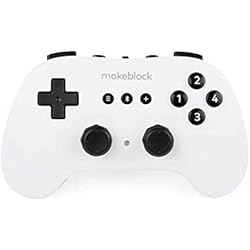
- Makeblock mBot Robot Kit with wireless Bluetooth remote controller
- Allows users to operate and code the metal robot car
- Offers an entry-level learning experience for robotics and programming
- Includes coding software platform for beginners - mBlock blockly App
- Enables control of the robot with the wireless controller
- Designed for kids to learn Arduino and Scratch language
| Brand Name | Makeblock |
| Toy Figure Type | Miniature Figure |
| character | Robot |
| Model Name | mBot Robot |
| Model Number | mBot |
| Number of Packs | 1 |
| Age Range Description | Kid |
| Set Name | mBot Robot Kit + Remote Controller |
| Manufacturer recommended age | 0 - 10 years |
| Material Type | Alloy,Metal |
| Outer Material | Aluminum |
| Finish Type | Glossy |
| Theme | Car,Robot |
| Color | Silver |
| Collection Name | Robotic Cars |
| Style | mBot Robot Kit + Remote Controller |
| Additional Features | Remote Control, Coding Education |
| Play Activity Location | Tabletop |
| Recommended Uses For Product | learning, group_play |
| Educational Objective | STEM |
| Indoor Outdoor Usage | Indoor |
| Number of Players | 1 |
| Operation Mode | Manual |
| Number of Pieces | 1 |
| Size | Small |
| Scale | miniature |
| Item Weight | 2.3 lbs (1.04 kg) |
Who Should Buy?

-
Students Learning STEM
Ideal for students interested in science, technology, engineering, and mathematics to gain practical coding experience.
-
Hobbyist Programmers
Perfect for enthusiasts looking to explore coding and robotics through hands-on experience and experimentation.
-
Learning Environments
Great for classrooms or educational workshops aiming to engage students in interactive and fun learning activities.

-
Advanced Programmers
Experienced coders may find this kit too basic and not challenging enough for their skill level.
產品描述
About This Item
Introducing the Makeblock mBot Robot Kit with Wireless Bluetooth Remote Controller - the perfect kit for all your coding and programming needs! This metal robot car allows you to build your own robot from scratch and learn the Arduino and Scratch programming languages. The Makeblock mBot Robot Kit comes with a wireless Bluetooth remote controller, giving you complete control over your robot car. With this kit, you can explore the world of coding and programming in a hands-on and engaging way. Makeblock is known for its high-quality coding robots, and this kit is no exception. This educational coding robot is designed to inspire young minds and encourage STEM learning.
By building and programming their own robot, children can develop valuable skills in problem-solving, critical thinking, and creativity. The Makeblock mBot Robot Kit is the perfect tool for introducing kids to the exciting world of coding. With its wireless control capabilities, this metal robot car is easy to use and operate. Simply connect the robot to your device via Bluetooth and start coding.
Whether you're a beginner or an expert, this kit offers endless possibilities for exploration and learning. The Makeblock mBot Robot Kit is a DIY robot building kit, allowing you to personalize and customize your robot car to suit your preferences. The metal construction ensures durability and allows for endless hours of fun and learning. Get ready to embark on an educational adventure with the Makeblock mBot Robot Kit. This programmable robot car offers a unique hands-on learning experience, making it the perfect choice for parents, educators, and anyone interested in coding and robotics. Invest in the future of STEM education with the Makeblock mBot Robot Kit.
Start building and programming your own robot car today and unleash your creativity and imagination. The possibilities are endless with this educational DIY robot kit.
有疑問? 和我們聊天
客戶問題與解答
-
問題:
What is included in the Makeblock mBot Robot Kit?
Answer: The Makeblock mBot Robot Kit includes all the necessary components to build and program your own robot. You'll find a metal frame, electronic parts, a wireless Bluetooth remote controller, and various sensors. This kit also comes with an extensive user manual and access to the mBlock programming software, which supports both Scratch and Arduino programming languages, making it ideal for beginners and experienced coders alike. By utilizing versatile components, this kit enables users to engage in countless projects and enhance their coding skills. -
問題:
What skills can I learn using the mBot Robot Kit?
Answer: Using the mBot Robot Kit helps develop a range of skills, particularly in robotics and programming. Users can learn foundational concepts of coding through graphical programming with Scratch, or delve deeper with Arduino programming. The hands-on approach encourages problem-solving and critical thinking skills as users troubleshoot issues and experiment with various functions. As you create different projects, you gain practical knowledge that can be applied in real-world scenarios, such as robotics competitions or educational workshops. -
問題:
Is the mBot Robot Kit suitable for beginners?
Answer: Yes, the mBot Robot Kit is specifically designed for beginners. The kit includes detailed instructions and access to tutorials that guide new users step by step through the assembly process. The mBlock software simplifies programming, using block-based coding similar to Scratch, making it accessible for young learners. With its user-friendly interface and guided projects, users can quickly build confidence in their programming and robotics skills, paving the way for more complex coding challenges in the future. -
問題:
Can the mBot be programmed with my smartphone?
Answer: Yes, the mBot can be programmed using a smartphone via the Makeblock app, which is available for Android and iOS devices. This app allows you to control the robot and program it using an intuitive interface. Users can connect the mBot to their smartphone via Bluetooth and explore a variety of pre-built projects or create their own. Programming on-the-go makes it easier to collaborate with peers or teach others about robotics and coding, enhancing the learning experience. -
問題:
What types of sensors are included with the Makeblock mBot?
Answer: The Makeblock mBot Robot Kit includes several types of sensors that enhance its functionality and capabilities, such as an ultrasonic sensor for distance measurement, a line-following sensor for navigating paths, and LED lights for visual feedback. These sensors can be used in various projects, allowing users to program the robot to react to its environment. Experimenting with these sensors can teach fundamental concepts in robotics and automation, making it a valuable educational tool. -
問題:
Can the mBot be controlled remotely?
Answer: Yes, the mBot can be controlled remotely using the included wireless Bluetooth remote controller. This feature allows users to operate the robot from a distance, making it convenient for demonstrations or remote operation projects. Additionally, the mBlock software enables programming the robot to follow complex commands, creating an engaging interaction between the user and the mBot. This remote capability can enhance activities such as obstacle courses or coding challenges, making learning more interactive. -
問題:
Is the Makeblock mBot compatible with other Makeblock products?
Answer: Yes, the Makeblock mBot is compatible with various other Makeblock products and accessories. This compatibility allows users to expand their robot’s capabilities by integrating additional sensors, motors, and even components from the Makeblock platform. For example, users can attach different sensors for unique projects or combine multiple kits for larger robotic assignments. This versatility helps foster creativity and innovation, empowering users to explore and build complex robotic systems. -
問題:
What age group is the mBot Robot Kit appropriate for?
Answer: The Makeblock mBot Robot Kit is recommended for ages 8 and up, making it suitable for children, teenagers, and even adults interested in learning robotics and programming. Its user-friendly design and educational materials are tailored to engage younger learners while also providing depth for older users. Schools and educational institutions often use this kit to introduce students to STEM subjects, showcasing its wide appeal and adaptability for various educational levels. -
問題:
What programming languages can I use with the mBot?
Answer: The mBot Robot Kit supports programming with Scratch and Arduino, catering to different user skill levels. Scratch, a block-based visual programming language, enables beginners to grasp coding principles easily, while Arduino offers more advanced users the chance to write their own code in C/C++. This flexibility allows users to start with the basics and progressively take on more complex challenges, making it a suitable option for varied learning paths and skill progression. -
問題:
Where can I buy the Makeblock mBot Robot Kit in Taiwan?
Answer: You can purchase the Makeblock mBot Robot Kit with Wireless Bluetooth Remote Controller from Ubuy in Taiwan. Ubuy offers an extensive range of educational toys and robotics kits, ensuring a convenient shopping experience. With their user-friendly website and numerous payment options, you can easily find the mBot Robot Kit and other similar products to enhance your learning or teaching experience in coding and robotics.
Makeblock Science Kits & Toys mBot Editorial Review
Makeblock Bundle of mBot Robot Kit + Remote Controller is an engaging toy that harnesses the joy of robotics and coding education for kids. This miniature robot kit is designed for ages up to 10 years, constructed with durable alloy and metal materials, and features a glossy finish in silver. The mBot operates via remote control and fosters STEM learning, making it a fantastic choice for young learners. Reviews highlight the ease of assembly and the fun factor during playtime, while the manual operation mode encourages kids to interact with technology constructively. Its compact size ensures that it can be used easily on a tabletop.
Customer Reviews & Ratings
6 客戶評價
-
5 星
64%
-
4 星
0%
-
3 星
0%
-
2 星
36%
-
1 星
0%
評論這個產品
和其他客戶分享您的想法
優點
- Encourages creativity and learning in children
- Durable alloy and metal construction
- Remote control feature enhances play
- Compact and easy to set up
- Supports STEM education initiatives
缺點
- May require adult supervision during assembly
Platform Trust & Buyer Confidence

JK
Jasmin
Verified buyer
“Great products and very good service: very easy and very fast international delivery.”
9 September 2026 · via Trustpilot
AG
Anke
Verified buyer
“Wonderful online shopping experience, smooth transaction from the start. Payment method works conveniently and delivery is unexpectedly fast and reliable. You go the extra mile for service. What makes this even more amazing, you deliver to Namibia. I will remain a happy Ubuy customer and will increase my purchases for sure! Thank you!”
10 September 2026 · via Trustpilot
H
Hazel
Verified buyer
“Very easy to find the products what you need, and so fast delivery, that’s why I highly recommended to others costumers to used ubuy.”
10 September 2026 · via Trustpilot
O
Opaleye
Verified buyer
“I received exactly what I ordered I was skeptical about your site because that was my first time to order. But the order came timely and neatly packaged. I was not disappointed. Thank you.”
11 September 2026 · via Trustpilot
AC
Adele
Verified buyer
“Easy to find and order what you want on the website. Delivery is quick to the UK”
8 September 2026 · via Trustpilot
安全結帳
Global Delivery
Easy Returns
Genuine Products
Product Price History
重要資訊
- 限制:對於國際運輸的產品,請注意任何製造商保修可能無效;製造商服務選項可能不可用;產品手冊、說明和安全警告可能不是目的地國家的語言;產品(及隨附材料)的設計可能不符合目的地國家的標準、規範和標籤要求;並且產品可能不符合目的地國家的電壓和其他電氣標準(如果適用,需要使用適配器或轉換器)。收件人有責任確保產品可以合法進口到目的地國家。當從Ubuy或其關聯公司訂購時,收件人是記錄在案的進口人,並且必須遵守目的地國家的所有法律和法規。
- 由於Ubuy是一個全球搜索引擎,因此並非Ubuy上列出的所有產品都在出售。產品受出口/貿易法規的約束。
TWD 4921
立即訂購並活動它 週二, 九月 29
This item is not restrict in my country.(Please click on above link if this item is not restrict in your country, So our team will review and allow.)
QTY:
Secured transaction
PCI DSS compliant and ISO 27001:2022 certified, with encrypted payments and full buyer protection on every order.
Our Top Logistics Partners
Fastest cross-border delivery
特色和優勢
- Wireless Bluetooth Remote Controller provides double joy of remote control and learning mobile algorithms.
- Kids can learn code step by step with the mBlock blockly App.
- The handle is more effective and accurate to pair with robot providing instant enjoyment.
- The controller offers fun group play and racing experience with one-on-one bluetooth pairing.
- The kit provides Screen-free, realistic feeling of play, away from virtual computer/phone games.
- The kit was designed for kids to learn robot programming easily and enjoyably.
Ubuy Assurance
Experience worry-free shopping with 100% original products, PCI DSS-compliant payment security, ISO 27001-certified data protection, the fastest cross-border delivery, free returns *, and secure packaging on every order.