- Home Page /
- Electronics /
- Computer Accessories /
- Computer Accessories & Peripherals /
- Keyboards, Mice & Accessories /
- Mice /
- ProtoArc EM11 Pro Ergonomic Mouse for Large H...
0 ratings






Item #:
234928302
ProtoArc EM11 Pro Ergonomic Mouse for Large Hands, Side Scroll, Black | Designed for hands 7.5-8.5". Browser-based customization, Side scroll wheel
 1 Sustainability Highlights
Item #:
234928302
TWD 2310
Price Details
Excluding Shipping & Custom charges ( Shipping and custom charges will be calculated on checkout )
*All items will import from US
In stock
 Imported from USA store
QTY:
Order now and get it around Monday, August 17
Secured transaction
Ubuy works hard to protect your security and privacy. Our advanced payment security system ensures confidentiality by encrypting your information during transmission using AES (Advanced Encryption Standards) and SSL (Secure Socket Layer) protocols. Your payment details are 100% secure as we do not share your payment details with third party sellers.
Our Top Logistics Partners


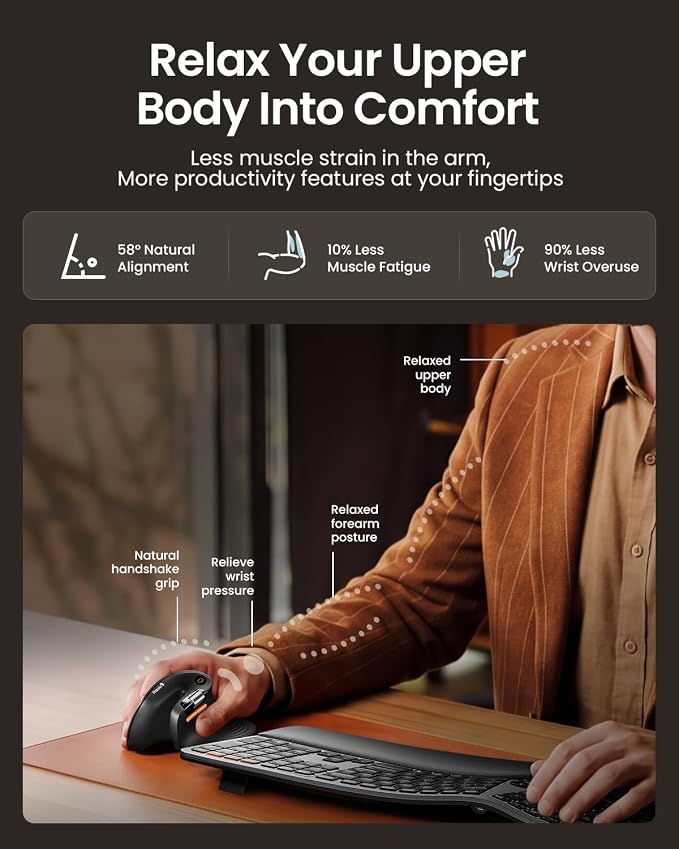
Choose the EM11 Pro for browser-based button customization, a time-saving side scroll wheel, and a 58° ergonomic design that reduces wrist fatigue by 90%.

Fast
Shipping

Free
Return*

Secure Packaging

100% Original Products

PCI DSS Compliance

ISO 27001 Certified


What Stands Out
Ergonomic Design
Specifically designed for large hands, the ProtoArc EM11 Pro promotes healthy wrist posture, reducing strain during extended use, making it ideal for professionals and gamers alike.
Multi-Device Connectivity
Seamlessly switch between multiple devices with Bluetooth capability. This versatile mouse enhances productivity by allowing users to control Windows, Mac, and Android devices effortlessly.
Programmable Features
Features six customizable buttons and side scroll functionality to tailor operations for various tasks. Users gain efficiency by personalizing their mouse to suit specific workflows.
Product Details
- Advanced Customization Web: No software to download. Configure 6 buttons, adjust DPI levels, and personalize your workflow—all from your browser without installing a single file. Create custom buttons for your favorite shortcuts, like copy/paste, Please note that the side scroll wheel cannot be customized
- Horizontal Scroll Wheel for Ease: This ergonomic wireless mouse features a side-mounted scroll wheel that lets you pan left and right with a gentle flick of your finger. Whether you're working on wide spreadsheets, long web pages, or expansive design canvases, horizontal scrolling becomes instant and natural—saving you precious time on view adjustments to boost productivity and workflow smoothness
- Ergonomic Vertical Design: Our ergonomic mouse wireless keeps your wrist naturally straight, putting your forearm and wrist in a more natural and relaxed position, which can reduce discomfort and strain, helping to improve productivity and reduce the risk of repetitive strain injuries compared to a standard mouse. Warm tips: We encourage you to relax your palm and hold the mouse naturally when using a vertical mouse
- Perfect fit for Large hands: Recommended hand size: 19.0–21.5 cm (7.5–8.5"), and its ergonomic grip effectively reduces wrist fatigue. For a better fit and comfort, please measure your hand size before ordering
- Connect up to 3 Devices: This ergonomic bluetooth mouse features dual Bluetooth and 2.4G USB-A connectivity modes for simultaneous connection of up to 3 different devices, and is compatible with Windows 8, Windows 10 or higher, Mac OS X 10.12 or higher, and Android 4.3 or higher
- Rechargeable Vertical Mouse: The Bluetooth Ergonomic Mouse has a built-in 500mAh Li-Ion battery that can be conveniently recharged using the included Type-C cable(The Type-C cable is for charging only)
- Adjustable DPI & Quiet Click : Up to 7200 DPI levels match your preferred speed and accuracy for different tasks; with the back and forward buttons, you can easily navigate websites and increase work efficiency.The silent click sound of the left and right mouse buttons help you focus on your work
- Learning curve: Since it takes a learning curve to get used to the shape when using our ergonomic mouse for the first time, it may cause inconvenience to your mouse grip, We recommend that you take 1-2 weeks to get used to it, as many users find that it will help reduce the pressure and pain on your wrist caused by long-term use of the mouse and improve comfort
| Connectivity Technology | Bluetooth, USB |
| Additional Features | Ergonomic Design, Multi-Device, Programmable Buttons, Rechargeable, Wireless |
| Movement Detection | Optical |
| Button Quantity | 6 |
| Hand Orientation | Right |
| Compatible Devices | Personal Computer, Tablet |
| Operating System | Android 4.3 or higher, Mac OS X 10.12 or higher, Windows 8, Windows 10 or higher |
| Number of Batteries | 1 Nonstandard Battery batteries required. |
| Hardware Platform | Mac, PC, Windows,Linux |
| Power Source | Battery Powered |
| Mouse Maximum Sensitivity | 7200 dots_per_inch (18288 cm) |
| Minimum Required Operating System Version | Windows 8 |
| Item Weight | 125 g |
| Unit Count | 1 Count |
| Brand | ProtoArc |
| Antenna Location | Office |
| Model Number | EM11 Pro |
| Included Components | 1 x 2.4G USB-A Receiver, 1 x ProtoArc Rechargeable Bluetooth Ergonomic Mouse, 1 x Type-C Charging Cable(The Type-C cable is for charging only), 1 x User Manual |
| Manufacturer | ProtoArc |
| Mfr Part Number | EM11 Pro |
| Color | Black |
| Style Name | Modern |
| Special Feature | Ergonomic Design, Multi-Device, Programmable Buttons, Rechargeable, Wireless |
| Movement Detection Technology | Optical |
What's in the box
1 x ProtoArc Rechargeable Bluetooth Ergonomic Mouse
1 x 2.4G USB-A Receiver
1 x Type-C Charging Cable(The Type-C cable is for charging only)
1 x User Manual
Who Should Buy?

-
Larger Hand Users
Designed ergonomically for larger hands, providing comfort and reducing strain during prolonged use.
-
Multi-Device Users
Ideal for users who switch between devices, supporting seamless connections with Windows, Mac, and Android systems.
-
Gaming Enthusiasts
Offers high DPI settings and programmable buttons, making it suitable for gaming and fast-paced applications.

-
Small Hand Users
May be uncomfortable and difficult to use for individuals with smaller hands due to its large design.
Product Description
Sustainability Highlights
This product has sustainability features recognized by trusted certifications.
Carbon impact
Carbon emissions from the lifecycle of this product were measured, reduced and/or offset. As certified by
The ClimatePartner certified product label confirms that a product meets the requirements for the five steps in climate action including calculating carbon footprints, setting reduction targets, implementing reductions, financing climate projects and communicating transparently to continuously reducing emissions. Learn more about this certification
- Certification Number
- 5JC5BX
Have any Query? Chat with us
Customer Questions & Answers
-
Question:
What makes the ProtoArc EM11 Pro Ergonomic Bluetooth Mouse suitable for large hands?
Answer: The ProtoArc EM11 Pro is specifically designed for users with larger hands, providing a comfortable grip that reduces strain during prolonged use. Its vertical mouse design promotes a natural wrist position, minimizing the risk of repetitive strain injuries. This ergonomic shape allows for better control and ease of use for tasks requiring precision, such as graphic design or gaming. This mouse is ideal for professionals working in offices or at home who value comfort and functionality. -
Question:
How does the side scroll feature work on the ProtoArc EM11 Pro?
Answer: The ProtoArc EM11 Pro comes equipped with a unique side scroll feature that allows users to navigate horizontally through spreadsheets or large documents effortlessly. This function is controlled by a designated button on the mouse, providing a smooth and intuitive experience. It's particularly beneficial when editing large files or reviewing presentations, making it an excellent tool for professionals and students who often work with extensive datasets or design projects. -
Question:
What are the advantages of using a vertical mouse like the ProtoArc EM11 Pro?
Answer: Using a vertical mouse like the ProtoArc EM11 Pro helps reduce wrist strain and promotes a more natural hand position. This ergonomic design encourages a handshake posture, which decreases tension in the arm and wrist, making it a great option for those who spend long hours at the computer. It's particularly useful for graphic designers, data analysts, or anyone engaged in extensive computer work, helping to maintain comfort and prevent discomfort over time. -
Question:
Can the ProtoArc EM11 Pro connect to multiple devices?
Answer: Yes, the ProtoArc EM11 Pro supports multi-device connectivity, allowing users to switch seamlessly between multiple devices, such as computers, tablets, and smartphones. This versatility is especially advantageous for professionals who work across various platforms, as it streamlines productivity. For instance, a user may effortlessly transition from using a laptop for work to a tablet for casual browsing without needing to disconnect and reconnect, enhancing the overall user experience. -
Question:
What DPI settings does the ProtoArc EM11 Pro offer?
Answer: The ProtoArc EM11 Pro features a high DPI of up to 7200, ensuring precise tracking and responsiveness across different surfaces. Users can adjust the DPI settings to suit various tasks, such as increased sensitivity for gaming or lower sensitivity for pixel-perfect design work. This adaptability makes it suitable for both casual users and professionals who require high accuracy, ensuring that it meets a wide range of user needs. -
Question:
What can I do with the 6 programmable buttons on the ProtoArc EM11 Pro?
Answer: The ProtoArc EM11 Pro includes 6 customizable buttons that can be programmed to perform specific functions based on user preferences. This means you can set them up for quick access to frequently used commands, macros, or shortcuts. For example, graphic designers can program buttons for quick tool selection, while gamers can assign actions for strategy execution, enhancing efficiency and accelerating workflow across different applications. -
Question:
Is the ProtoArc EM11 Pro compatible with various operating systems?
Answer: Yes, the ProtoArc EM11 Pro is designed to work seamlessly with Windows, Mac, and Android operating systems, providing flexibility for users across different platforms. This cross-compatibility allows users to utilize the mouse with their preferred devices without compatibility issues. It’s perfect for those who may switch between a PC for work, a Mac for creative projects, and an Android tablet for casual use, all without needing multiple mice. -
Question:
How do I charge the ProtoArc EM11 Pro mouse?
Answer: The ProtoArc EM11 Pro features a rechargeable battery, making it convenient for users who prefer a wireless solution. Simply connect the mouse to a power source using the included USB cable to charge it. This capability allows for extended use without the need for replacing batteries, contributing to sustainability. Users can easily charge it overnight, ensuring that the mouse is ready for use the next day, whether for work or leisure. -
Question:
What makes the ProtoArc EM11 Pro a good choice for prolonged use?
Answer: The ProtoArc EM11 Pro is designed with user comfort in mind, featuring an ergonomic shape that supports extended use without causing discomfort. Its vertical orientation aligns the wrist in a natural position, reducing fatigue during long hours of operation. This makes it particularly well-suited for professionals who engage in extensive tasks such as coding, design work, or general office activities, as it combines functionality with user health benefits. -
Question:
Where can I buy the ProtoArc EM11 Pro Ergonomic Mouse in Taiwan?
Answer: You can purchase the ProtoArc EM11 Pro Ergonomic Bluetooth Mouse from Ubuy. They provide a reliable platform with various purchasing options tailored to customers in Taiwan. Ubuy is known for its wide range of products and customer-centric service, making it a convenient choice for acquiring this ergonomic mouse designed to enhance your computing experience.
ProtoArc Mice EM11 Pro Editorial Review


In the realm of ergonomic peripherals, the EM11 Pro vertical mouse has garnered mixed feedback from users who are transitioning from previous models. Many customers appreciate the improvements made in this newer iteration, particularly in terms of comfort and functionality compared to its predecessor, the EM11 no-pro. Users have highlighted notable features such as customizable buttons, near-silent clicks, and a robust size that fits well for larger hands. However, while some users revel in the ergonomic design, others have noted that the mouse is Considerably larger and has an awkward footprint. Petite users, in particular, have expressed concerns regarding comfort, with some feeling that the design does not cater well to smaller hands. The surface material was mentioned frequently, with several users finding it smooth but difficult to grip securely, leading to concerns during usage. Another significant drawback includes the limited functionality of the horizontal scroll wheel, which some users described as more of a gimmick than a useful feature unless additional software enhancements are made. Overall, while the EM11 Pro does exhibit significant potential for ergonomic improvement, it seems that the user experience might hinge heavily on individual hand size and preferences, as well as the need for better software support to unlock its full capabilities. **
Customer Reviews & Ratings
146 customers ratings
-
5 Star
41%
-
4 Star
13%
-
3 Star
19%
-
2 Star
19%
-
1 Star
8%
Review this product
Share your thoughts with other customers
Pros
- Comfortably fits larger hands
- Customizable buttons
- Silent clicks enhancing the user experience
- Improved DPI settings over previous models
- Enhanced ergonomic design from predecessor
Cons
- Not suitable for small hands
Platform Trust & Buyer Confidence

MA
Mohammad
Verified buyer
“Excellent quality and original too,when ubuy send original things I will appreciate that ,I very satisfied thank you”
23 July 2026 · via Trustpilot
CK
Chitra
Verified buyer
“The order and delivery progress was communicated very well. Package arrived within the estimated time. Products arrived as expected in good condition.”
22-Jul-26 · via Trustpilot
K
kund
Verified buyer
“Good supply of products. Safe payment methods, and shipment worldwide! Genuine products.”
23-Jul-26 · via Trustpilot
OO
Onesi
Verified buyer
“Was my first time buying a product from Ubuy, but I found it so helpful. This is reliable. Gonna place a new order!”
22 July 2026 · via Trustpilot
SJ
SAO JOHN
Verified buyer
“Ubuy is a great online platform to buy stuff. Reliable, fast delivery time and great value for money. I've been using Ubuy online shopping platform for three years now and will continue to do so.”
23 July 2026 · via Trustpilot
Secure Checkout
Global Delivery
Easy Returns
Genuine Products
Product Price History
Important information
- Limitations : For products shipped internationally, please note that any manufacturer warranty may not be valid; manufacturer service options may not be available; product manuals, instructions, and safety warnings may not be in destination country languages; the products (and accompanying materials) may not be designed in accordance with destination country standards, specifications, and labeling requirements; and the products may not conform to destination country voltage and other electrical standards (requiring use of an adapter or converter if appropriate). The recipient is responsible for assuring that the product can be lawfully imported to the destination country. When ordering from Ubuy or its affiliates, the recipient is the importer of record and must comply with all laws and regulations of the destination country.
- Not all the products listed on Ubuy are for sale, as Ubuy is a global search engine. Products are subject to export/trade regulations.
TWD 2310
Order now and get it around Monday, August 17
This item is not restrict in my country.(Please click on above link if this item is not restrict in your country, So our team will review and allow.)
QTY:
Secured transaction
PCI DSS compliant and ISO 27001:2022 certified, with encrypted payments and full buyer protection on every order.
Our Top Logistics Partners
Fastest cross-border delivery
Features & Benefits
- Browser-based button customization for tailored functionality.
- Time-saving side scroll wheel for efficient navigation.
- 58° ergonomic design drastically reduces wrist fatigue by 90%.
- Seamless connection for up to 3 devices.
- USB-C charging for quick and easy power.
- Ideal for large hands (19.0–21.5 cm) with a comfortable grip.
Ubuy Assurance
Experience worry-free shopping with 100% original products, PCI DSS-compliant payment security, ISO 27001-certified data protection, the fastest cross-border delivery, free returns *, and secure packaging on every order.